
The awork test shows that the software offers solid task management as well as time tracking and resource planning. In this review, you can read what else the Hamburg-based company emphasizes and which features are convincing.
Intro
In this awork test and review, features are highlighted and the most important criteria for selecting a project management software are used. This should give you a good overview of the pros and cons. A first overview is provided by the summary of the review of awork “In a nutshell”.
The most important facts in brief:
- As task management software, awork offers a good basis for cooperation, especially for agencies
- With individual Kanban boards, automation and a solid timeline, the foundations are laid.
- Time tracking offers more than many competitors and can also be used via the app, which makes bookings much easier.
- The data storage takes place on server locations in Frankfurt and complies with the DSGVO
- The pricing system is clearly arranged. There is no freemium version and you get a fully featured software even in the cheap version.
- Support is provided via chat and phone
- awork is not designed for comprehensive project planning – at least in the classic sense of project management
awork Partner Deal
Simply enter the awork Partner Deal code PMTOOLS10 to get an additional 10% discount on the first year with awork* .
The company awork
awork is a software that was originally created by HQLabs GmbH from Hamburg in Germany. HQLabs GmbH was founded in 2012 and initially developed the HQ agency software. Following the sale of HQLabs and the focus on awork GmbH in 2019, the 40-strong team is now focusing on supporting productive project work with modern software. This review is based on two extensive tests. In 2020, the focus was on the premium version and in 2024 on the business plan, both in a 14-day trial, i.e. provided free of charge by awork.
What features does awork offer?
In our test, Awork proved to be a solid piece of software that focuses on providing a good and intuitive user experience. Compared to pure task management software in the Kanban-style , awork offers more advanced features such as resource planning, time tracking, and a simple timeline with planning capabilities.
At the beginning of the test you create a project and can define first tasks. Brief help guides in the software show new users how to get started. Templates make it easy to get started with projects and tasks. Thanks to the intuitive operation, you don’t need any further support to find your way around the basics in the program.
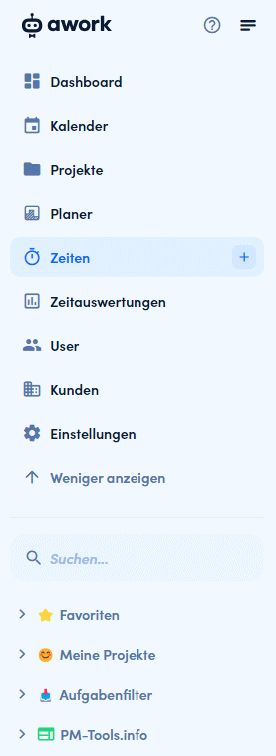
The program is divided into a sidebar with menu and personal area as well as the main screen. The menu is the main navigation to the individual areas: Dashboard, Calendar, Projects, Planner, Times and time evaluations as well as other settings. On the main screen you can always see the selected menu item and edit content.
The overview in projects is simplified with seven menu items in the main view:
- Home – the project profile
- Tasks
- Board – the Kanban Board
- Timeline – Display of tasks on the timeline or in the calendar
- Times – Bookings of working times
- Files
- Settings – All settings for the individual project
In detail, this review goes into all the individual menu items in the following feature overview.

Project planning in awork
Basic equipment for project planning is included in awork. However, you can only expect the basics such as a project profile, task management and a proper timeline. There are even simple dependencies between tasks, so that most projects can be displayed well. What goes beyond this and may be required for more complex projects according to waterfall planning – network plan, critical path, complex dependencies or work breakdown structure – is currently not supported and is not the focus of awork.
General project data
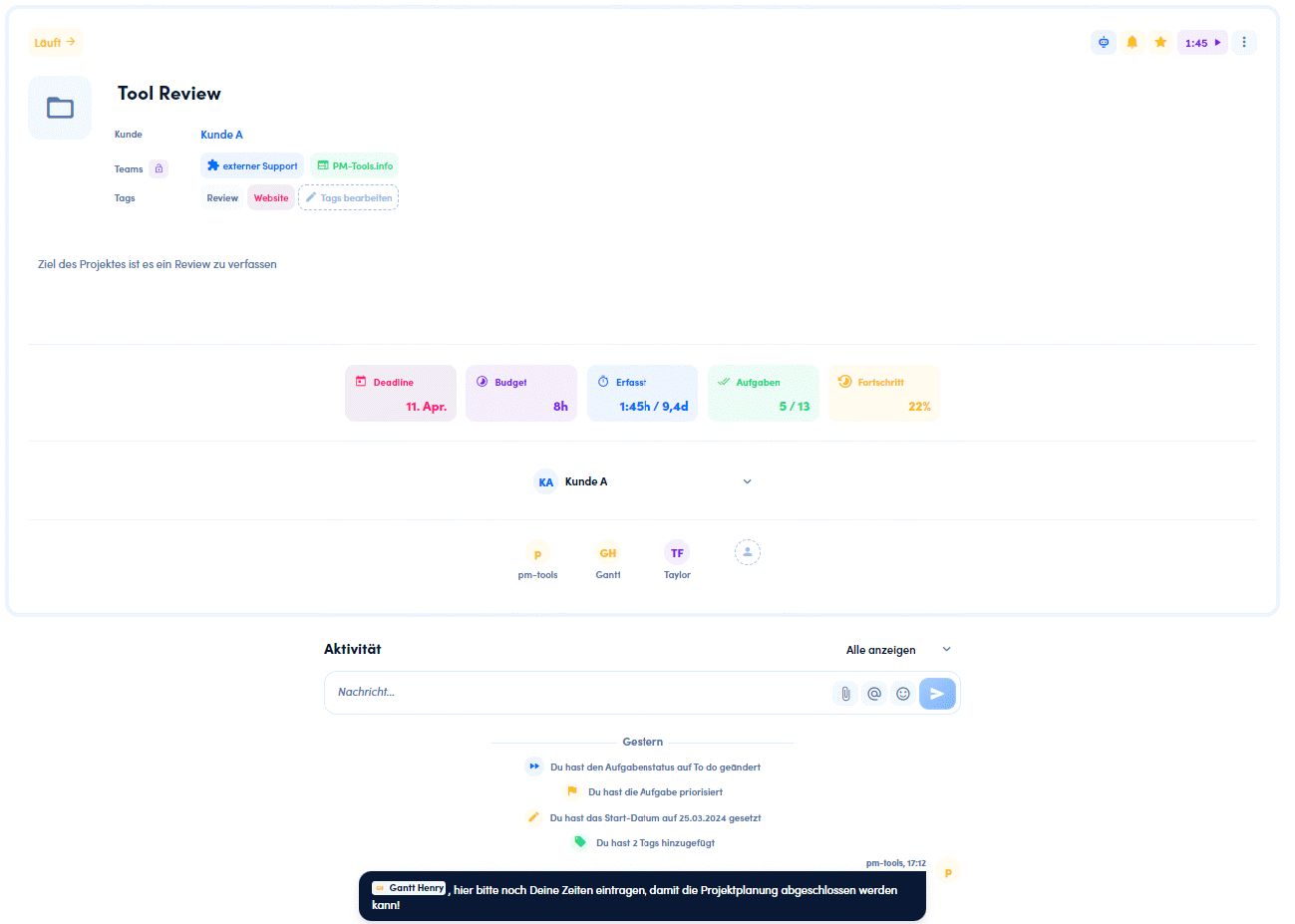
You can enter the most important information on Home as a project profile, such as
- Project name
- Project status (Planning, Running, Completed..)
- Type of project (customer project, internal project)
- Assign keywords (tags)
- Project description
- Tasks and progress
- Participants in the project
In addition, you can see an activity stream from the project e.g. with changed deadlines and completed tasks.
Task Management
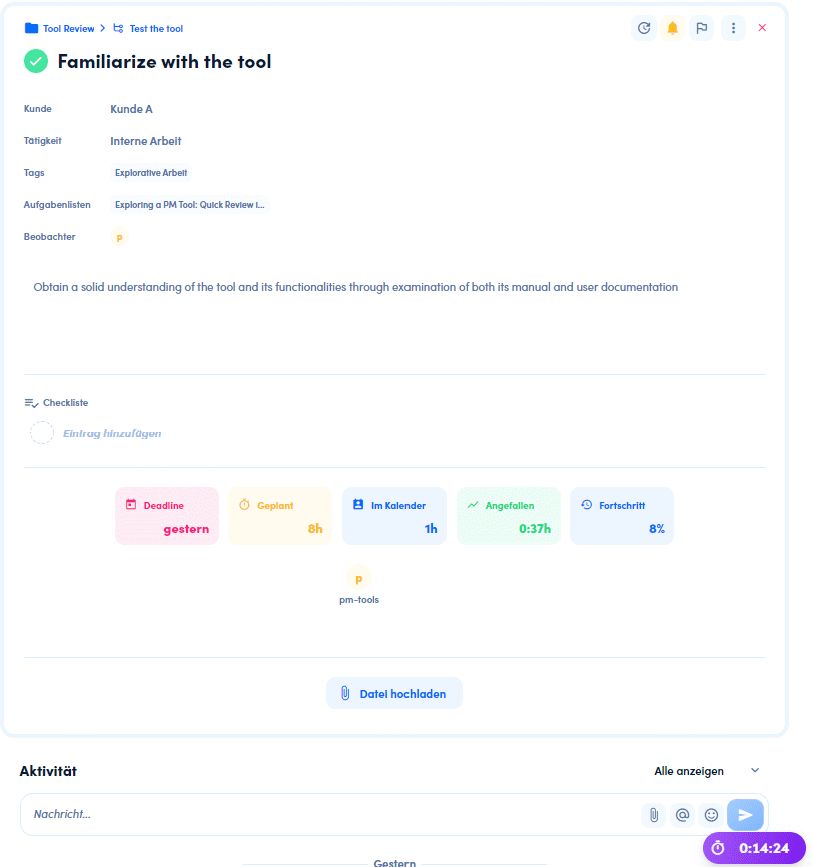
The presentation of each task is similar to that of the project brief. You can enter description, editor, deadline, etc. This lays the groundwork for later timeline and resource planning. Interesting is the multi-assignment of a task to several agents, which reflects the reality especially in teamwork.
The upload of files is supported and you can mention other users via activities.
Via the automation function, a kind of autopilot can simplify your projects and reduce administrative work. awork provides over 400 different automations.
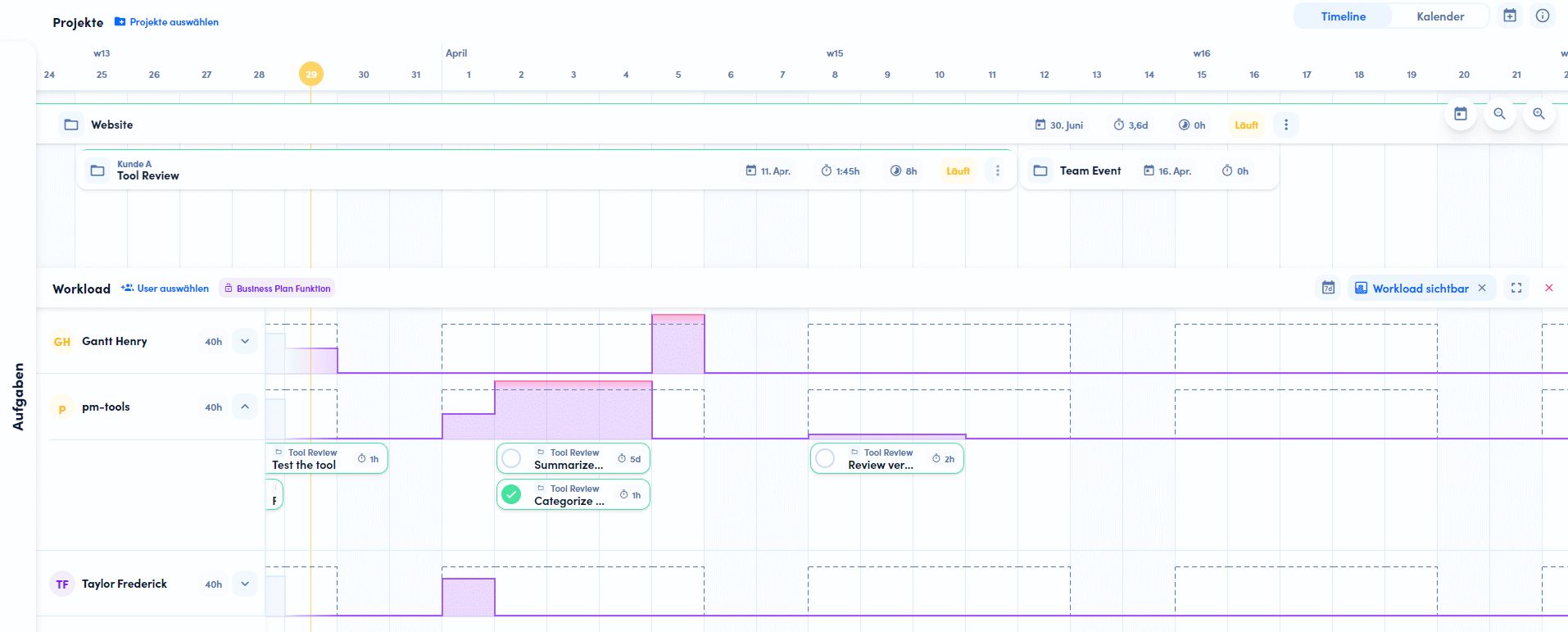
Gantt chart or Gantt plan
With the different views for views, awork limits itself to the most important displays such as task list, Kanban board and timeline/calendar. When working with views, you will quickly notice that awork places great value on simplicity. This benefits the quick familiarization and intuitive editing.
Timeline can be used to keep a good overview of the project and give the team a visualization in time. Es ist zu beachten, dass Aufgaben nicht automatisch in die Zeitleiste übernommen werden. This has the advantage that you only take on the most important tasks and thus maintain an overview. Various options are conceivable: Either only include the milestones and project phases in the timeline and thus maintain an overall overview of the tasks or plan the project down to the hour and assign tasks to individual employees via the calendar view.
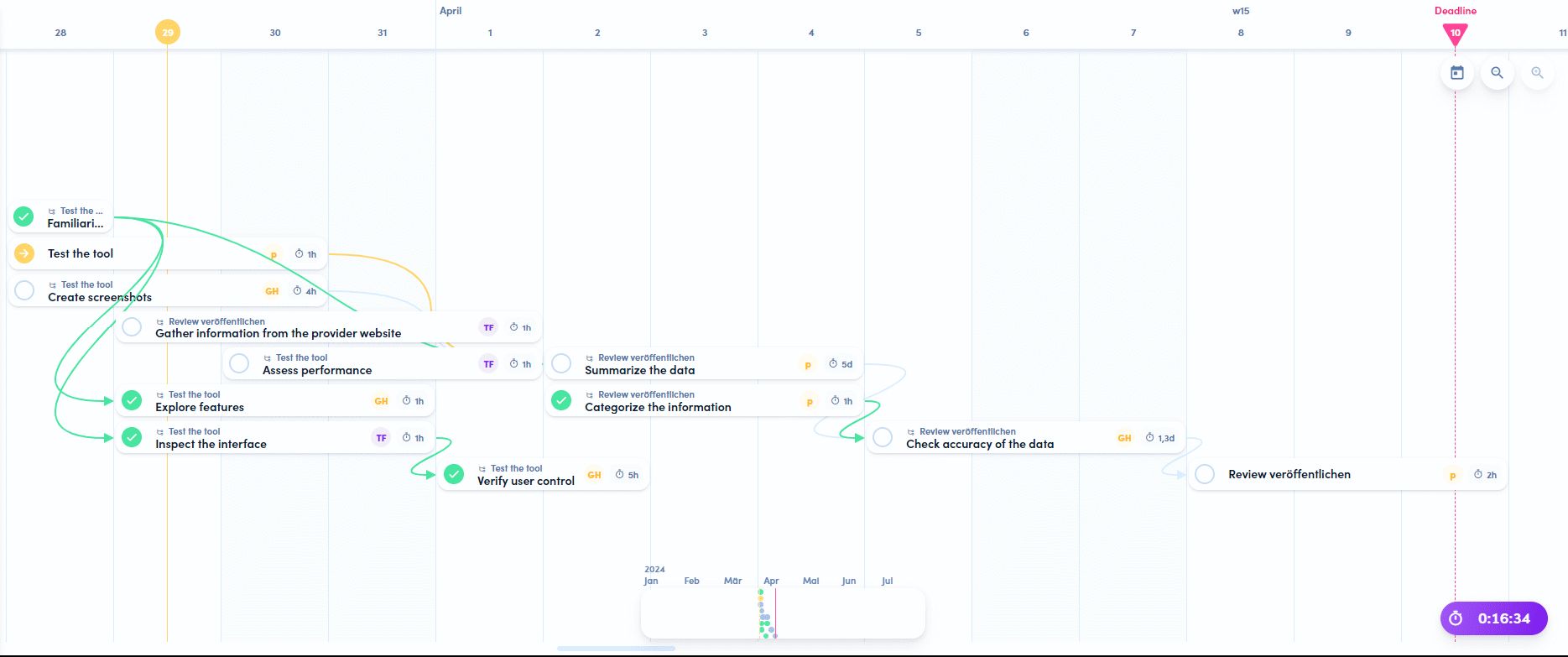
As mentioned earlier, in-depth project planning is not awork’s main focus. However, awork has since added support for traditional project plans: Since late 2025, it has included a dedicated Gantt view with task bars, start and end dates, dependencies, and the ability to export as PNG or SVG (awork release history). However, a complete representation of critical paths or network diagrams based on traditional project management methodology is still not supported.
By the way,
. Another free tool for creating milestone schedules and network diagrams is GanttProject.
Communication and cooperation with awork
As a project management software, awork naturally emphasizes successful collaboration. Visualization of tasks is a part of it. Here again the simplicity of awork becomes apparent. It’s nice that there is no exaggeration here and the focus is on the most used representations. In addition to the temporal representation in the timeline already described above, there is also the list and the Kanban Board.
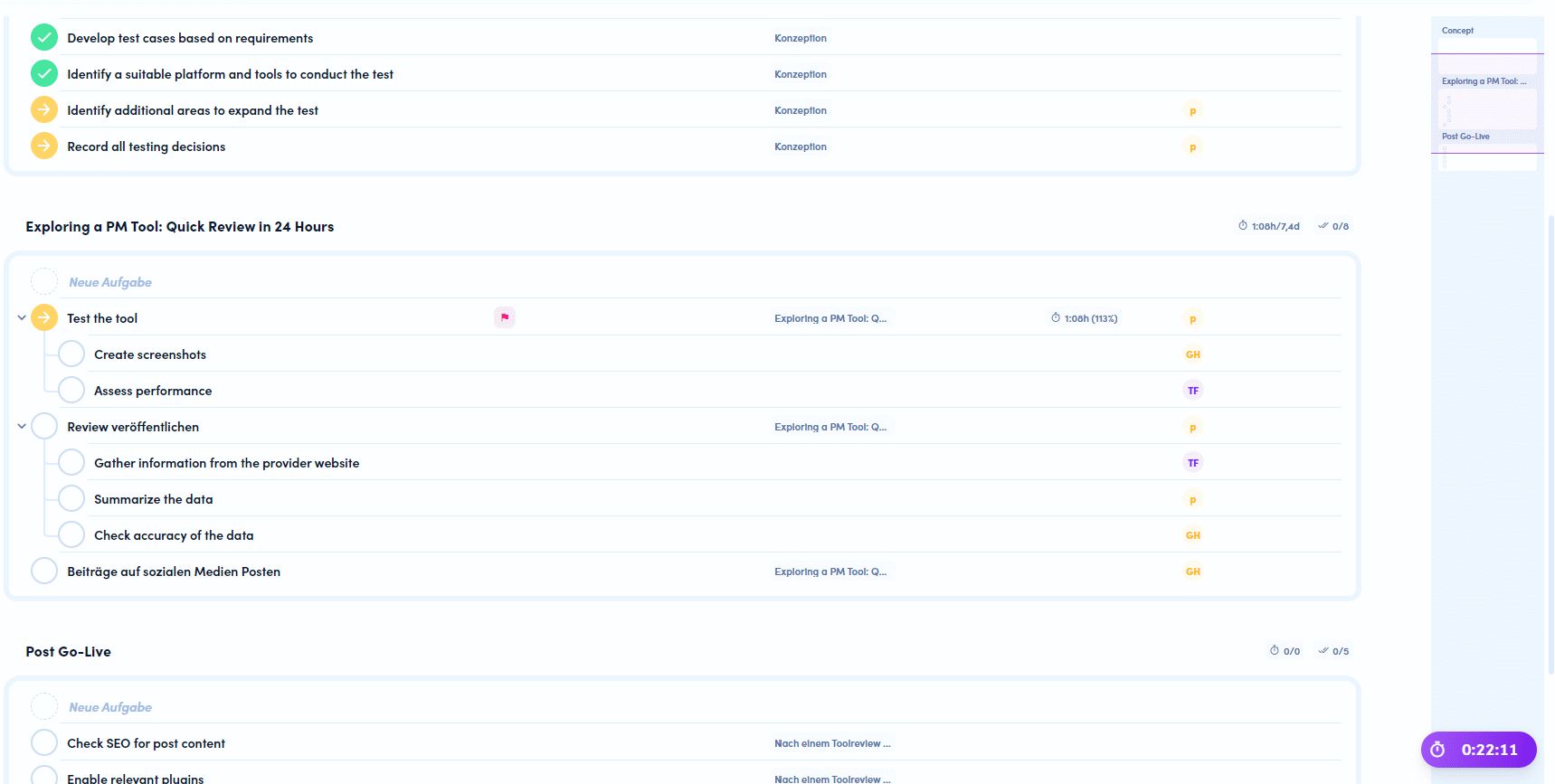
Thetask lists displays all tasks of the project divided into different lists. This is the perfect representation to create new tasks, add them via the import function and structure the project with lists. What stands out is a limitation to 6 columns shown to simplify visibility. The display of a minimap on the right-hand side is a very positive feature. This allows you to keep track of a larger backlog.
The Kanban Board can be customized to your own needs. Thus, the columns and labels of columns can be changed or deleted completely. This allows any workflow to be mapped. The predefined task lists can also be mapped, so you can also map different project areas or teams.

The personal dashboard is a great way to keep track of current projects, tasks and deadline. Minimal individualization is possible and even times and absences can be displayed. Overall, however, the most common widgets that you need to start your working day remain.
The user can be informed about notifications via email, internal notification in awork or the app. The decisive factor can be various events, from the status change of a task to the mention of one’s own name via @-Mentions in the comments.
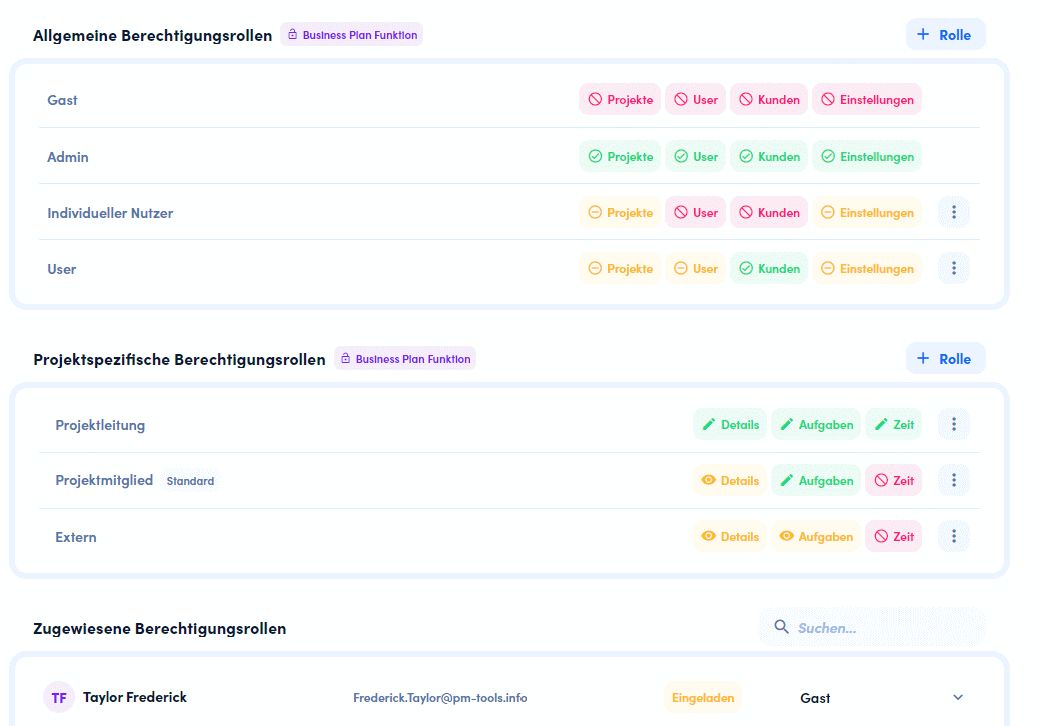
The rights and role system enables the assignment to defined roles such as project management, project member or external. But an individual role definition is also possible. Nice to see, awork considers the “Principle of Least Privilege” when creating new individual roles and initially all rights are grayed out.
A chat function is not integrated, but can be extended via external providers Slack or MS Teams.
Requirements management
Requirements management is not directly provided for in awork. However, with practice, you can create a project type that can be used for conceptual projects via reviews and automation.
Resource planning
If you want to plan the team and need a good overview of the workload in the next weeks to months, you can use the team planning. Here you can see a workload at the project level and at the user level. With absences, vacations can be entered and a forecast of the workload is also possible. Even a 10-hour limit for working timeper day can be set if required to meet occupational health and safety requirements. In the awork planner, a forecast for new projects can even be integrated into the workload.
Project controlling
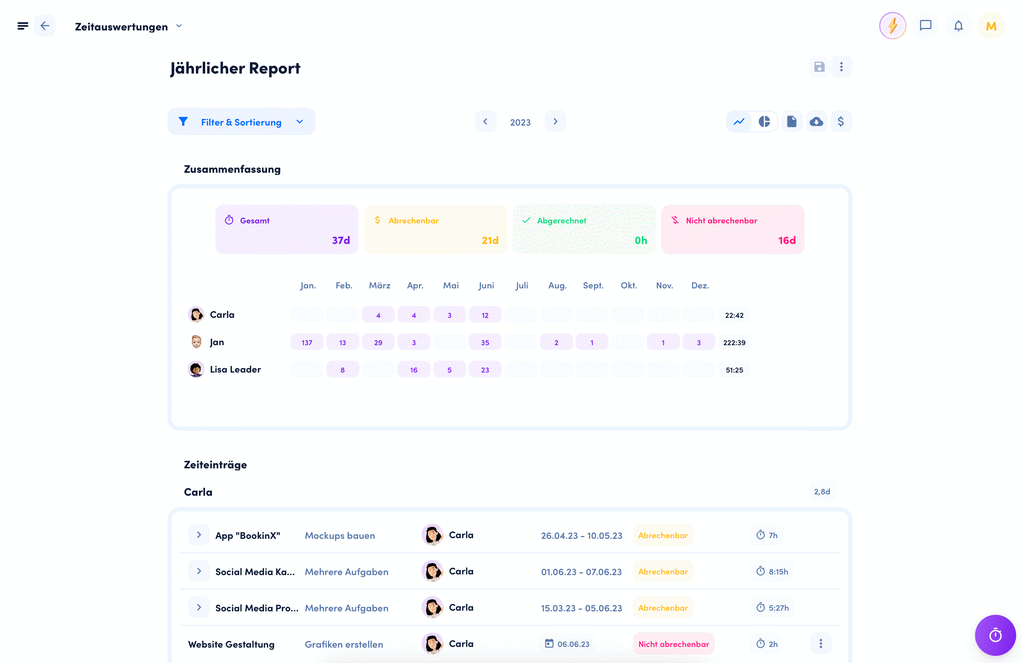
Controlling can easily be done via the time evaluations. With the creation of monthly reports, you can keep track of the project budget. The progress in the project can be linked to the completion of tasks, so that you can also track the achievement of goals. A connection to Google Sheets enables further analysis of the project.
Document Management
In addition to easily uploading documents and connecting to external cloud storage services such as Google Drive or OneDrive, awork has now integrated its own document module, awork Docs (since 2025). This allows users to create documents directly within the platform, either on a project-by-project basis or across the entire workspace—including real-time collaboration, version control, and PDF and Markdown export (awork release history). However, it does not replace a traditional document management system with approval workflows.
Multi-project management
All projects can be controlled in list view or on a timeline via the Projects menu item. The planner provides resource planning across several projects and users or teams, so that the workload in the department or company can be estimated well. As far as the evaluation of key figures is concerned, which is important in project portfolio management, you can make settings via the dashboard, but you have to use the external integration with Google Sheets or the awork API for advanced options.
How does awork perform in the most important evaluation criteria?
Features and functionality
Awork offers more than a solid base of features for project management and team collaboration. However, the focus is on collaboration and not on long-term project planning with network and work breakdown structure. The overview of the entire project portfolio and fundamental areas such as risk management are also not taken into account. What is particularly convincing are the areas of resource planning and time recording and evaluation, which you don’t always find in other software or have to pay extra for.
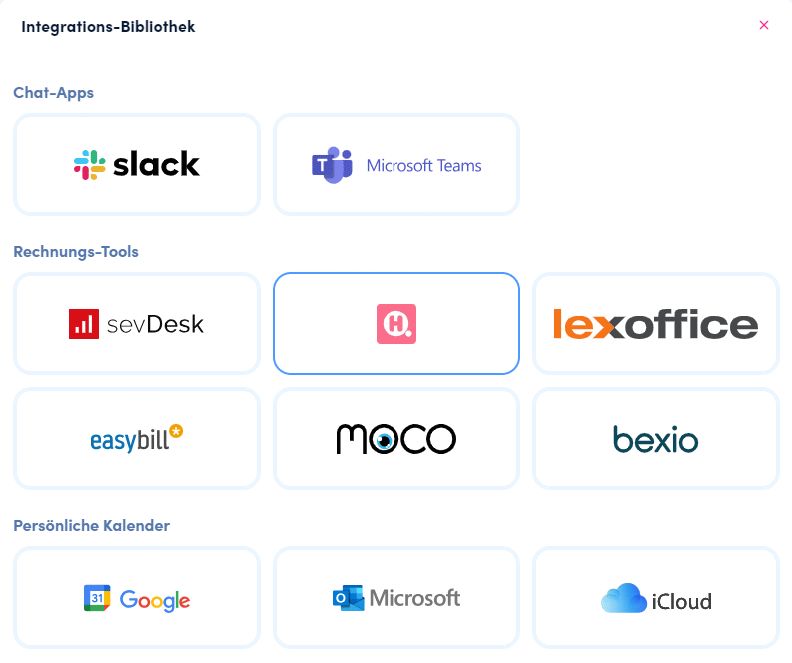
In the settings, you can still make various integrations at the project level. In addition to Slack and MS Teams as chat and various invoicing tools, Zapier and Webhooks are currently of particular interest. Especially with Zapier you can integrate a lot of external tools.
Especially when processes in projects of a company remain the same over a longer period of time, awork facilitates the work with individualization. With the creation of specific project types, you can build your own templates or use existing ones. Whether the automation with certain rules, the columns on the Kanban board or fixed task packages to start – one has the possibility this depending upon project type again to specify
Other evaluation criteria
- Single sign-on can be set up via the usual providers, as can SCIM.
- Cloud storage and calendar integration are possible for Google and Microsoft.
- The only languages currently available are English and German. Thus, the DACH region can be solidly covered and international communication in the western world is also possible.
- The premium version can be used free of charge for 14 days for testing purposes.
Use of AI
The project templates offer the option to use artificial intelligence for text recognition. You describe your project plan, and the AI generates tasks that match the plan. In our test, this generally worked well. However, two things stood out:
- The new tasks were created in English, although the program setting was “German”.
- The task list must always be checked by the project creator – blind trust in artificial intelligence is not advisable.
Meanwhile, awork has made significant progress in this area: With awork AI (in beta since 2025), there is an AI assistant built right into the app that can create and assign tasks, adjust timelines, update statuses, and generate client updates and briefings based on the current project context. awork emphasizes GDPR compliance and the fact that user data is not used to train the AI; admins can disable the feature across the entire workspace (awork release history). Our latest awork updates from Q1 2026 provide an overview of other new features.
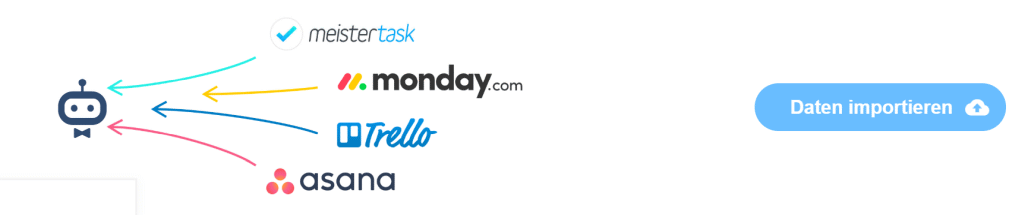
- An import feature makes it easy to switch from other project management tools. As examples, awork lists the following well-known tools: monday.com, MeisterTask, Asana and Trello.
User interface and ease of use
The interface is intuitive to use and the start is kept simple. This is where awork continuously develops its software instead of relying on too many functions. Anyone who wants to set up a project as a project manager can do so in just a few steps. Team members will also quickly be onboard and find their way around thanks to the simple menu navigation. The minimap feature also helps here: Use awork on the big screen, so you can better keep track of large amounts of tasks.
The scope of awork is still manageable, and the more complex areas such as resource planning and time evaluations can only be viewed by certain groups of people. It is noticeable in a positive way that awork does not make any annoying internal advertising for the Enterprise version.
There are not many customization options in terms of design, so you will always find your way around. However, this can also be annoying, for example, if you want to display more columns in two places (task lists, project lists) or want to be able to define your own fields on the task. Otherwise, a dark mode and changes to the background logo are planned.
The awork mobile App
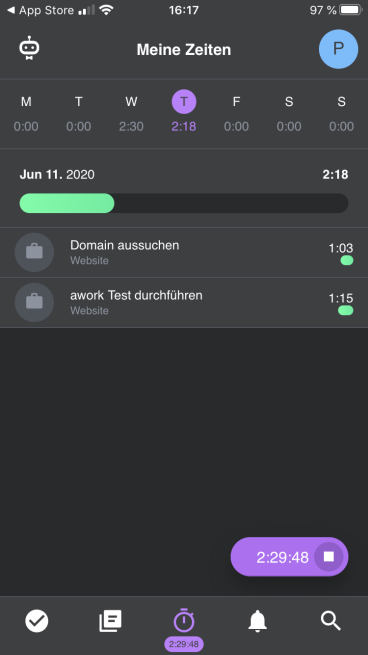
With an additional app, you can also edit your projects in awork well on the go.
One of the main advantages, however, is time tracking via the app. This means that you can also enter your times in offline meetings or at the customer’s site easily and directly via the app and do not have to add the 5-10 minutes for time recording at the end of the day. Via the Thumb menu you have alternatively access to
- the assigned tasks
- the projects in the company
- the current notifications

Data protection, hosting and service
Data protection – Where is the data located and where are the servers?
We comply with the EU General Data Protection Regulation (GDPR) and guarantee server locations in Germany with ISO 27001 certification.
awork website
With a focus on the German and European markets, data protection is a key component of awork’s offerings. Awork offers provides further information on data protection here and provides a template for data processing agreements .
Secure Data Centers in Germany
awork is backed by a complex technical infrastructure designed to ensure very high availability (> 99.99%), constantly up-to-date backups, and exceptionally high data security.System security
awork Security Factsheet
We use a variety of security features in awork. These include, for example, HTTPS encryption of your data, password security, and full encryption of our databases.
However, data is also processed for the operation of awork in the USA. However, only data for operation and further development is transferred. Data that is entered into the system, such as project data, files, etc., is not transferred or processed.
awork has recently stepped up its security measures: The platform is certified to ISO/IEC 27001:2022 (awork Information Security) and has supported multi-factor authentication via email or an authenticator app since late 2025 (awork Release History).
Accessibility and stability of the project management software awork
Important to know:
There is no self-hosted server installation; only the cloud version (SaaS) is available.
In testing, awork stands out consistently for its smooth performance. There are no outages, and the web application is very responsive. If the software ever does go down, you can check the current status of the software .
Support from the manufacturer (customer service) in case of problems
The Help Center provides documentation for the entire platform. In addition to a getting-started guide, all functional areas of the software are described in detail, and the most frequently asked questions are answered. You can also use the search function to describe your problem and narrow down possible areas.
Awork regularly offers webinars on specific topics. The recordings can also be viewed later, and there is a dedicated YouTube channel for in-depth content.
Incidentally, the support goes beyond a standard ticketing system with a chat function and personal telephone support on working days from 09:00 to 18:00.
Test of the Chat Feature
The chat feature was already tested for the awork review, and some of the information comes from that source. The response time was only a few minutes, and all questions were answered. We even received responses on a holiday: once from the AI bot and, exceptionally, also from a live support representative.
Costs when using awork
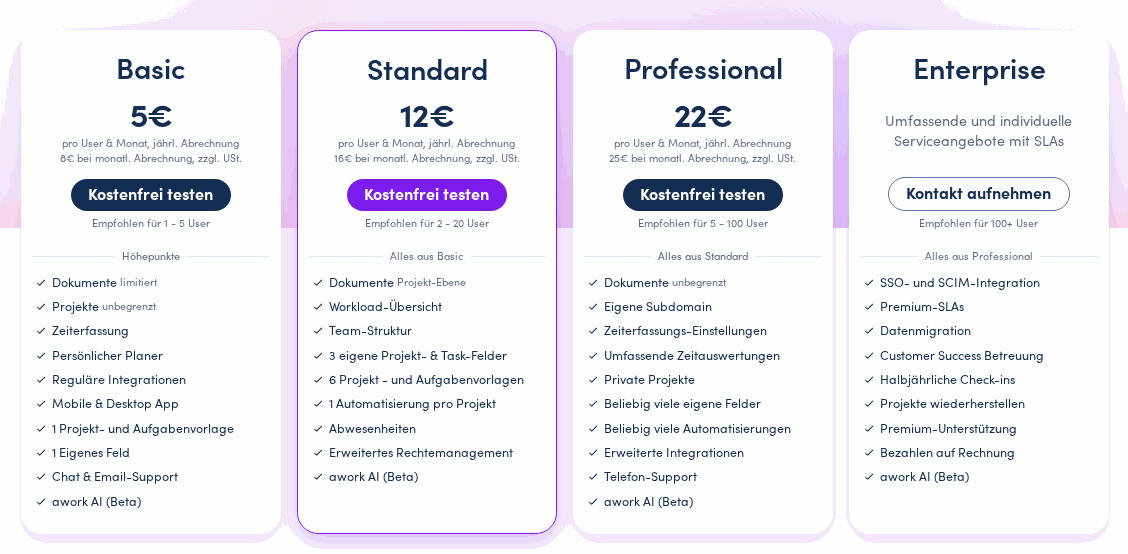
awork offers four pricing tiers: Basic, Standard, Professional, and Enterprise. awork now markets its former “Business” plan as “Standard”; in addition, a new plan called “Professional” has been introduced.
The subscription can be monthly, annual, or for two years. Those who sign up for a two-year term pay even less than what’s listed here in the review. However, that’s likely not the standard rate, which is why the figures for an annual contract were used. All prices are per user per month, plus sales tax (as of June 16, 2026, awork price overview).
By the way,
: A comparison of Awork’s costs with those of other providers: An overview of the costs of project management software.
Basic
The Basic plan is the entry-level version. It provides robust task management software that focuses heavily on team collaboration and includes time tracking. awork recommends this plan for small teams of 1 to 5 users.
awork Cost: 5€ per user per month (billed annually) or 8€ per user per month for monthly payments
Standard
The Standard plan (formerly “Business”) was tested in the review and is designed for professional companies with a team structure. In addition to the features of the Basic plan, it includes a workload overview, advanced permission management, and automations. awork recommends this plan for teams of about 2 to 20 users.
awork Pricing: 12€ per user per month (billed annually) or 16€ per user per month for monthly billing
Professional
The Professional Plan was added as part of the recent pricing overhaul and bridges the gap between the Standard and Enterprise plans. It is designed for larger teams (approximately 5 to 100 users) and offers additional features such as private projects, a custom subdomain, unlimited automations, custom fields and templates, and phone support.
awork Pricing: 22€ per user per month (billed annually) or 25€ per user per month for monthly payments
Enterprise
The Enterprise version makes the most sense for larger companies with their own IT infrastructure. It also gives you the option to
- store your own team URL for awork
- make use of the Enterprise Support
- pay the upcoming fees via invoice
- Restore projects
- SSO/SCIM possible
In addition, the manufacturer offers consulting services to help with integration into your organization. The plan is designed for larger organizations with 100 or more users.
awork Costs: Custom quote – Price upon request
Costs of awork in comparison
Attention:
Support high quality reviews and comparisons on pm-tools.info. Simply enter awork code PMTOOLS10 to receive an additional 10% off your first year at awork*.
| awork | 1 Nutzer | 5 Nutzer | 25 Nutzer | 75 Nutzer |
|---|---|---|---|---|
| Basic* | 96€ | 480€ | 2.400€ | 7.200€ |
| Business* | 144€ | 720€ | 3.600€ | 11.800€ |
| Enterprise* | 216€ | 1.080€ | 5.400€ | 16.200€ |
Our evaluation of awork as a project management tool
The advantages
As a task management software, awork offers a good basis of cooperation
Time recording offers significantly more than many competitors and can also be used via the app, which makes bookings much easier.
The workload overview provides a great representation of the current workload with projects, especially in the agency sector.
The data storage takes place on server locations in Frankfurt and complies with the DSGVO
The cons
There is no free basic version like some competitors – the awork review was done with the trial version.
awork is not (yet) designed for comprehensive project planning – at least in the classical sense of project management
An individually customizable overview of the entire project portfolio within large companies is missing or must be carried out via the API.core
For whom is awork worthwhile?
With HQ as agency software, HQLabs had already launched a small ERP system for agencies. With experience in the industry, the founders of awork GmbH and the software of the same name look for the sweet spot between task management and comprehensive project management software with a special focus on workload visualization and intuitive use in testing and review. The target audience are agencies, consulting firms or companies in the IT and software development sector.
If comprehensive planning is necessary and is to be structured precisely in terms of time, awork cannot keep up with alternative project planning tools. This applies to companies in the construction industry or to longer-term projects in general.
Apparently, the review covers the important points for an agency, resource planning, time recording and a rough overview of the timeline. Also, there are templates from awork that are based on mainly agency business usage as an example. Whether design, marketing or web agency, everyone wants to successfully carry out projects, bill hours and plan their own teams with mostly short projects. With the background of HQLabs and the available features, awork can definitely be recommended in service companies of various sizes.
As a self-employed person or freelancer, awork can be a good solution. The existing time recording system already provides a good basis for billing the customer. If you are very frugal, you can also use alternative tools free of charge with small teams, but then you may have to compromise on data protection or usage.
The use in larger companies(enterprise) makes sense especially in the customer and project-oriented area. Especially in modern structures and the mid-enterprise level, this new software brings a good counterpart for the usual non-intuitive tools in project management. In addition, awork can be used in individual teams, such as those with a customer focus (e.g. sales and service), in order to have a good overview of the work involved in projects.
awork Partner Deal
Simply enter the awork Partner Deal code PMTOOLS10 to get an additional 10% discount on the first year with awork* .
awork alternatives
- A comparable alternative to Task Management can beMeistertask – see Review.
- Monday.com (see review) represents a comparable overall solution – also cost-wise.
- With Wrike, you go one step further and have a tool at your disposal that also covers project planning.
- If data protection and German hosting are particularly important to you, it’s worth taking a look at Stackfield review—the GDPR-compliant alternative.
How to find the software for your project or company, you can see here in the guide.
Looking for the right tool? Compare awork with other options in our overview of project management tools, or browse our list of 106 PM tools.
Change history of the review
| Date | Updates |
|---|---|
| 16.06.2026 | Value-Based Update (Pricing, Features, Security): – New pricing model: Basic plan (€5), Standard plan (€12, formerly “Business”), new Professional plan (€22), Enterprise plan available upon request – all billed annually, plus VAT. – New Gantt view with dependencies and export – awork Docs (integrated document module) – awork AI (AI assistant, beta) – ISO/IEC 27001:2022 and multi-factor authentication added |
| 28.03.2024 | Revision of the entire review based on a retest of the software in the “Business” plan: – Taking into account releases from June 2022 through March 2024 – Complete design update at the end of 2023 for a more intuitive experience with awork – Multi-project overview in the timeline – AI feature – Calendar synchronization of tasks with Google/Microsoft – Additional integrations (e.g., SCIM, MS Teams) – Reports with Google Sheets – Send tasks to projects via email |
| 06.06.2022 | Update on the latest release (Hamster Release): – awork Planner – Personal Projects Update on the developer: Spin-off of awork |
| 19.12.2021 | Minor additions to the text via software updates (Einhorn release, Fox release): – Templates for tasks and projects – Ability to assign multiple staff members to tasks – Option to limit the workday to 10 hours in time tracking. |
| 09.03.2021 | – Single sign-on possibility via many central providers |
| 04.02.2021 | – Google Sheets connection for project evaluation |
| 05.01.2021 | – Target/actual comparison for efforts in tasks |
| 02.12.2020 | – Google Drive, OneDrive integration, Forecast in Team Management |
| 02.11.2020 | – Team management, task packages as templates |
| 08.10.2020 | – Minimap feature, overview of all files |
| 03.08.2020 | – Tasks Export to Excel |
| 06.06.2020 | – Automation of tasks possible |
* = Affiliate Links
This post is also available on:
 Deutsch
