
Wrike in 3 sentences also works, but doesn’t bring much to the interested reader. Learn more about Wrike’s features and functionality, pricing, and why support called after only two hours of testing in this review!
In this test and review, we’ll take a look at various features related to Wrike* to give you a good overview. We’ll focus primarily on the following topics:
Intro
The most important facts in brief:
- Wrike is a software for the management of the entire company
- There is a good Gantt chart and solid task management
- There are plenty of customization options—even in the mobile app
- Wrike supports data storage in the EU through a European data center
- There are no limitations in the number of users for free variants
- Approaches to document management and approval are available with the Proof addon
- Active support is already available during the test phase
The company
Wrike was founded in 2006 and currently has 1,000 employees. In February 2021, Wrike was acquired by Citrix for $2.25 billion. The project management software is said to have 20,000 customers and over 2 million users. Incidentally, a free basic version of Wrike for up to 5 users has been available since 2012. In this review, the Wrike Business version* was tested in a 14-day trial.
Getting started with Wrike
The Wrike * test begins with selecting a template. We choose the “Complex Project” template, as it includes both project planning and virtual Kanban boards. The basic structure of the project view consists of folders and projects. Projects have the same properties as folders, but include an additional date field to specify a duration. This already highlights Wrike’s focus as a comprehensive solution for the entire company. Tasks are nested within projects, allowing you to plan the project in a manner similar to organizing folders in a file manager.
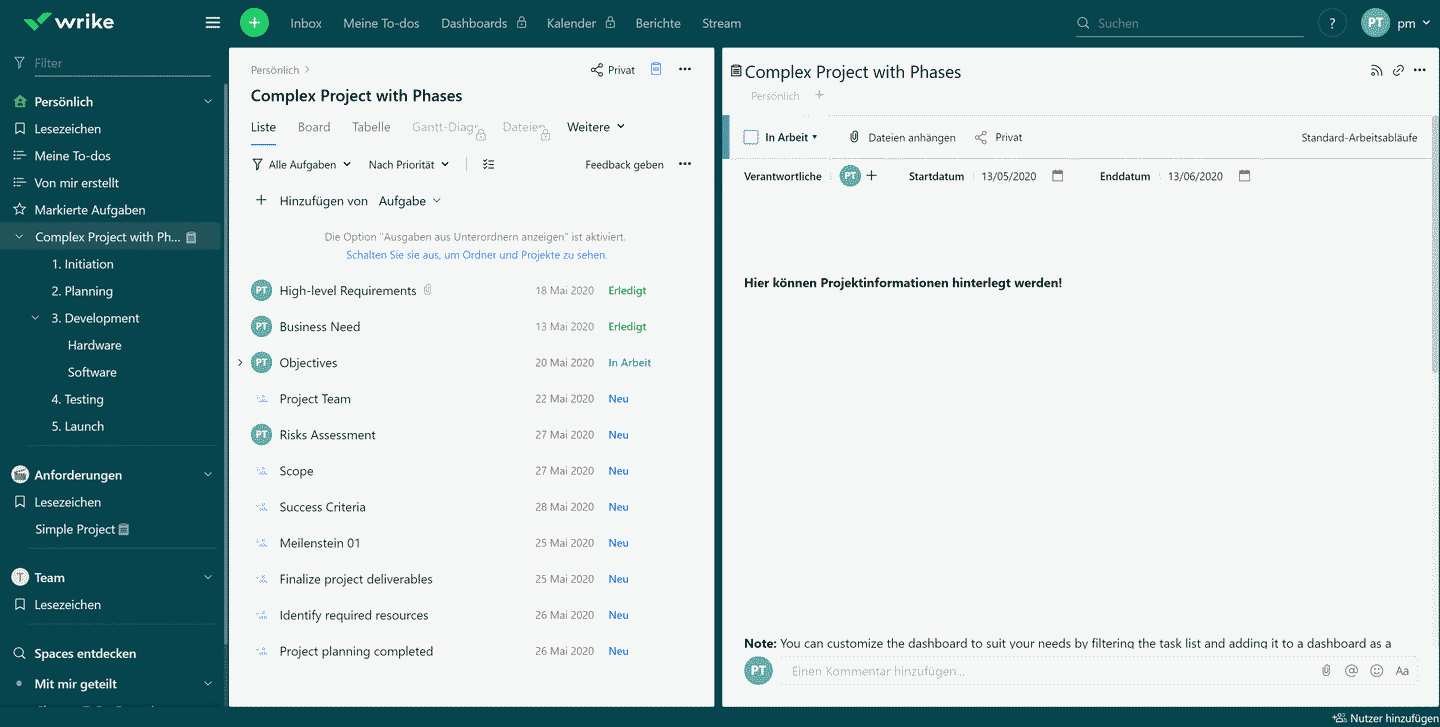
Wrike quickly shows in the test that it is not intended solely for the pure planning of projects but as a comprehensive project management tool. This covers most of the following functions:
Project planning in Wrike
Project planning is one of the cornerstones of project management software Wrike*. Project phases—which help create a better structure—or subprojects are represented by folders. General project data is stored at the highest level of the project.
Task Management
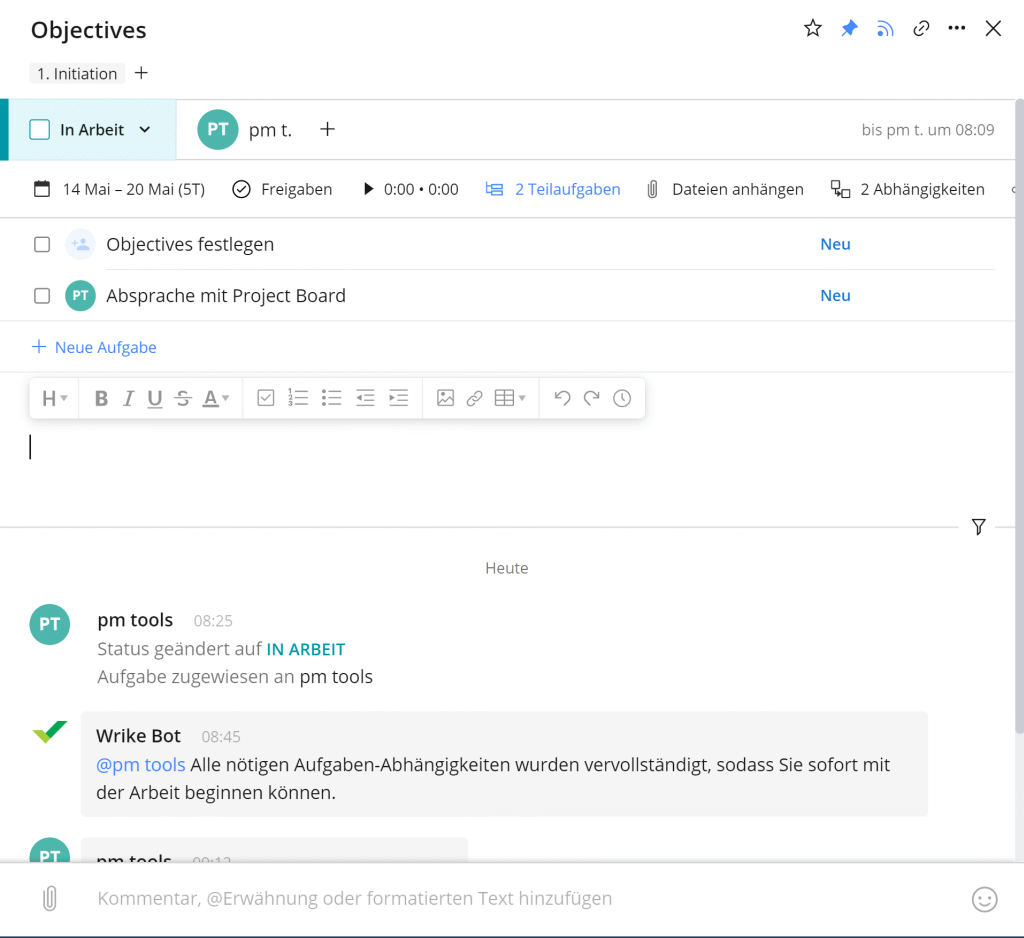
Within the project as well as the subordinate structures the simple task management in lists or other visualizations is possible. The usual task management information can be attached to a task:
- Description
- Responsible
- Duration in days
- Deadline
- File attachments
- Subtasks and timed tasks Dependencies
The description text can be designed comprehensively with lists, images and tables. What is unfortunately missing in the test are priorities. However, these can be set by yourself via individual fields. Attachments can be moved between tasks.
Milestone planning
Tasks can be transformed into the form of milestones. When starting a new project, you should begin with the milestones and project phases to get an overview of the time frame. Milestones can be processed in the same way as tasks.
Gantt chart or Gantt plan
In the overview view, the Gantt chart from Wrike* provides a solid overview of project phases, milestones, and individual tasks. You can set up predecessor and successor relationships and display the critical path. The integration with the overall task structure works very well. You can collapse subproject Gantt charts and view them separately. A nice feature is the ability to share snapshots from a specific point in time via a link. This makes it easy, for example, to share a status report or notify the subproject manager of a deadline.
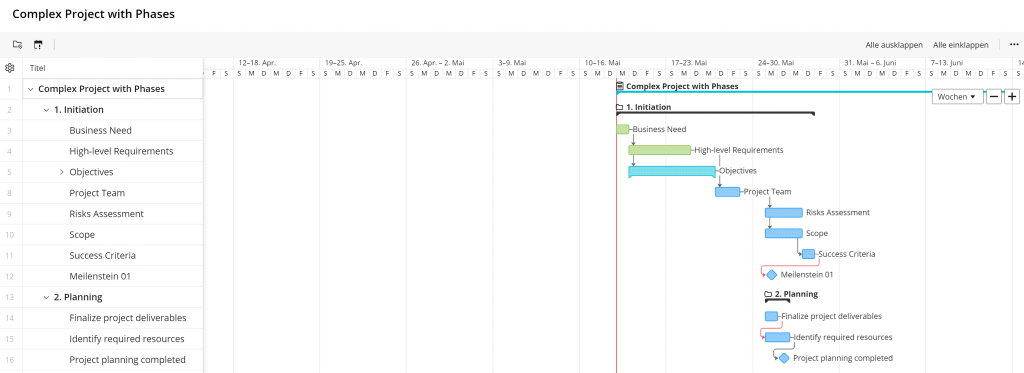
A network diagram or project structure plan is available and must be created—if necessary—either manually or using separate tools. A good free tool is GanttProject—here you can see how easy it is to generate a network diagram from the project plan.
Communication and collaboration with Wrike
Collaboration in Wrike * is an important factor in the project.

For example, Wrike shows the virtual Kanban board in addition to the task list in the review. This provides a basis for collaboration and it is possible to use filters to display the relevant tasks. A good addition is the creation of custom workflows that project tasks must pass through. For example, a release can be set to be able to complete a task.
Important to know:
The Kanban board is not the core feature of this software, but merely a supplementary view of the tasks. Those who use exclusively agile management methods such as Scrum or Kanban should opt for specialized software instead.
The personal view vs. general dashboards
In the personal view, users can manage all their own tasks. The usual project view with task list, Kanban board and Gantt chart is used. Also analytics are possible and show one how many tasks have been done etc. Additional dashboards can be supplemented with new widgets. This involves, for example, overdue tasks or progress across all projects.
Simplification of project communication on a task basis
At the task level, you can attach even more information. Mentioning via “@” is possible in comments, so you can see a notification about the comment.
- Time bookings
- Comments with Mentioning about “@”
- Log of all activities
- Approvals by project participants
Roles and permissions
There is in Wrike* an administrator, regular or external users, and guests. Each role has different permissions and can be assigned by the administrator.
Requirements management
Requirements management can be well integrated into Wrike by using approval with a customized workflow for tasks and placing it ahead of editing in the project. Otherwise, there is no separate requirements management.
Resource planning
Wrike has developed its own addon for resource management. This can be booked separately to the standard software via the account settings. With the addon, the effort for tasks can be unlocked. Newly added with it are work time lists for the view of all entered hours of the team and the overview of the workload.

Project controlling
Project management features in Wrike* are extensive: First, there’s basic analysis at the project level. Here, for example, you can view the number of completed tasks or a timeline showing the project’s progress.
Time analysis is also available at the project level, providing a project manager with an overview of booked times. From this you can quickly read whether you are over or under the set budget.
Additional analysis can be performed with the Wrike Analyze* add-on, which also supports a forecast function.
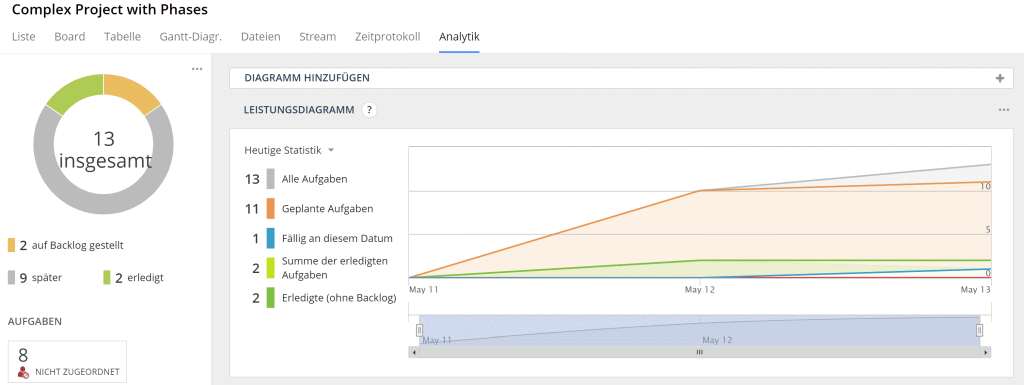
Theextra report functioncan also be used to generate weekly reports of all kinds.

Document Management
In Wrike you can upload and edit general files. There is a possibility to view and compare versions of the files. Proper editing is also possible via the file view, widget or proof editor.
With Wrike Proof addon you have the possibility to establish shares for files such as videos, images and documents. Even external guests can perform a document review. However, the Proof addon is only available as an additional subscription and is not integrated into the standard application.
Conclusion – Wrike Proof offers a solid foundation for file approval, but it does not yet provide a complete document management solution. However, the integration with SharePoint—which allows you to extend the Proof Editor—is likely to be of interest.
Multi-project management
With Wrike* makes it easy to manage multiple projects. You can create projects using the folder structure. The dashboard provides an overview of the progress of all projects. You can also view the timeline of various projects using the calendar.
How does Wrike perform in the most important evaluation criteria?
Features and functionality
The functionality of Wrike is really comprehensive. There are almost all the features you would want in a project management software. The focus will be on planning and working with schedules. Nevertheless, cooperation and collaboration are not neglected.
Since our initial review, Wrike has significantly expanded the platform with AI features (under the “Work Intelligence” brand). These include the basic AI Essentials available starting with the Team plan (AI in tasks, automations, and forms), advanced AI Elite actions available starting with the Business plan, and the AI assistant Wrike Copilot, which summarizes work status and generates reports. The generative AI runs on the Azure OpenAI Service; customer data is not used to train models. You can find an overview of the latest developments at Wrike in our year-in-review news article.
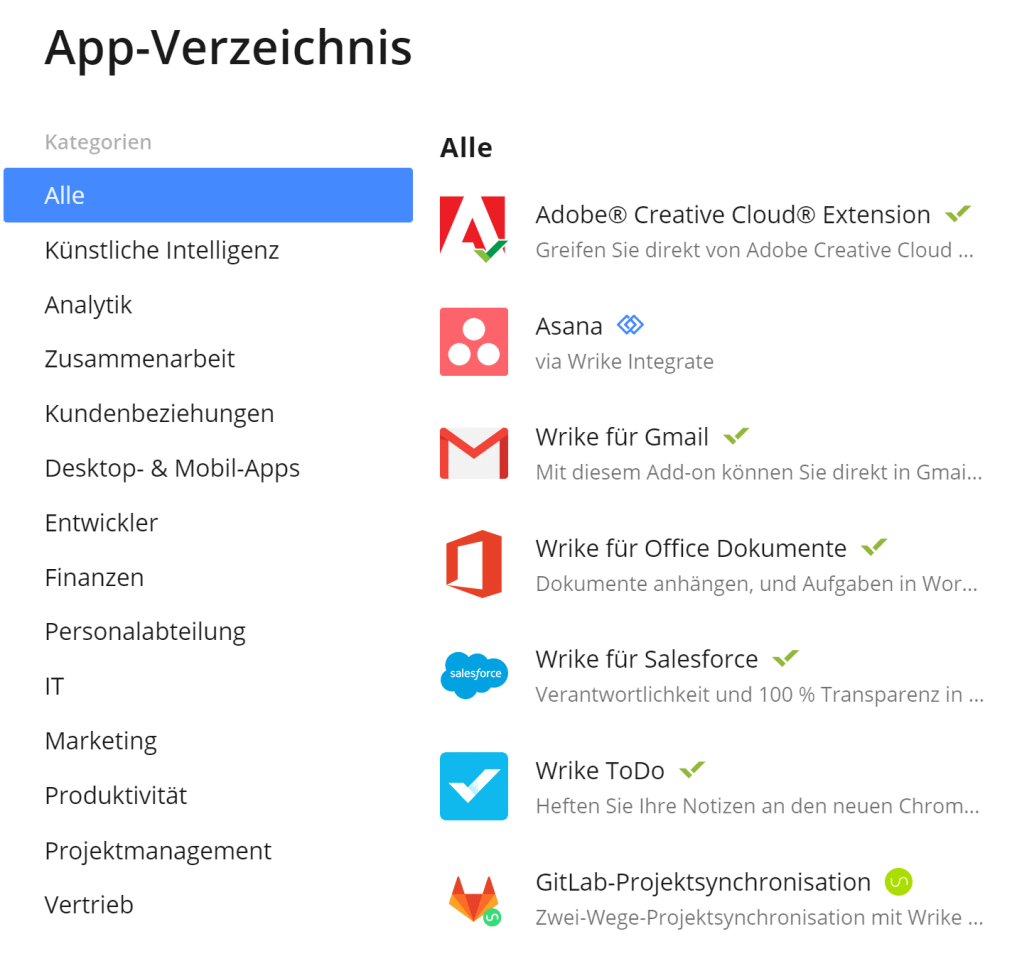
And if you are still missing one or the other feature, you can find it in the list of additional integrations. Access via the Wrike API also allows the development of custom applications.
There are also a desktop app and a mobile app available as extensions. The browser can be used with be enhanced with .
Important
: Integrating additional applications requires a paid activation for the Integration Subscription.
Other criteria of evaluation
- The language can be set to 10 different variants, which allows international editing in the project.
- All versions can be used free of charge for 14 days for testing.
- Request forms are a handy feature to introduce processes such as ordering from IT or leave into the organization.
User interface and ease of use
Wrike* has a clear and intuitive basic structure. The interface is kept very simple to keep the focus on the content. For example, there are few options for changing the view (you can only prominently display your own company logo in emails or use the default view in the software).
Due to the many contents and possibilities, this software is of course not as intuitive to use as a simple task management software. Therefore, we at Wrike Review also need some time to get used to it. However, once you have worked with this tool, you will quickly find your way around.
On a positive note, functions that are not enabled by subscriptions do not appear as blocked. This can often seem confusing.
The Wrike app in a short test
The Wrike app provides the ability to collaborate on projects while on the go. The default setting of the app focuses on communication in the project:
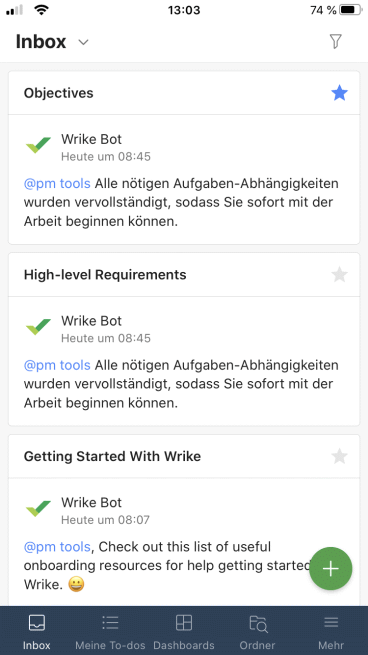
- The “To-dos” show an overview of the tasks to be completed.
- The dashboard offers the analogous view to the web version
- The Inbox displays the notifications of the projects in Wrike.
- The folders show the sidebar of the web variant. This allows you to see all lists, projects and tasks at a glance
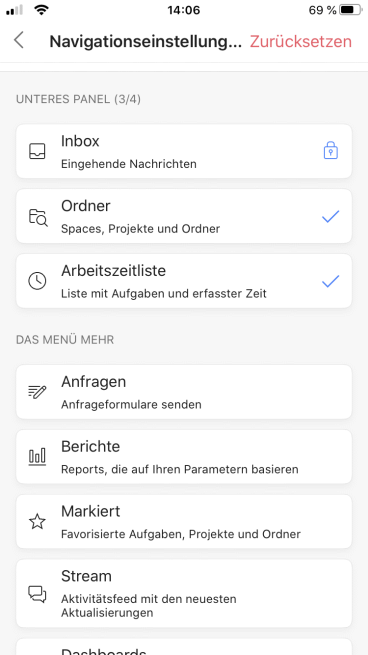
A convincing feature is theindividualization of the thumb menu(menu at the bottom of the screen). You can alternatively select reports, project activity feed and other menu items. The inbox always remains, but you get to decide on 3 out of 4 menu items. In terms of document management, the app-side document scanner is suitable for having your documents approved later via Proof.
Data protection, hosting and service
Data protection – Where is the data located and where are the servers?
The issue of data protection is important to Wrike* is definitely a priority. Part of this involves operating a European data center where data can be stored within the EU (according to official information, in Paris). Accounts with a European registration address are automatically assigned to the EU data center; it is not possible to transfer them back to the U.S. data center at a later date. Upon request, Wrike provides a Data Processing Agreement (DPA) in accordance with the GDPR.
In addition to standard encryption (TLS during transmission, AES-256 at rest), you can also purchase the “Lock” add-on, which provides an additional layer of security using a customer-managed key. Wrike is certified to ISO 27001, 27017, 27018, and 27701, as well as SOC 2 Type II, and holds CSA-STAR certification; two-factor authentication (MFA) is available. Learn more directly from Wrike in the Security section.
Accessibility and stability of Wrike project management software
Important to know:
There is no self-hosted server installation; only the cloud version (SaaS) is available.
The cloud solution runs very smoothly, and there were no noticeable delays during testing. Wrike proactively notifies users of upcoming updates and potential outages. You can check Wrike’s current status here.
Support from the manufacturer (customer service) in case of problems
Wrike provides an extensive online help center. Here you will find videos, interactive training and an active community of users. With the help center you can quickly find your way around the software.
For current problems, you can either fill out a contact form or support case, or reach out for help. In the support case, there is an option to select a callback service to find a quick solution. There is even the possibility to switch to a live chat on the website.
You can find more information about support in a post about the top experts.
Support Right Away During the Trial
Just two hours after signing up for the trial version, the support team called to ask if I needed any help. This can be seen as good customer service and a marketing strategy. In any case, as a customer, you’re not left on your own during the trial period.
Costs when using Wrike
The Pricing Overview in Wrike is divided into several tiers, ranging from Free to Apex. The prices shown are per user per month with annual billing; the feature sets vary between the different versions. Note: Wrike has revised its pricing plans —the “Professional” plan has been renamed “Team,” and as of January 2026, there is a new enterprise tier called “Apex.”
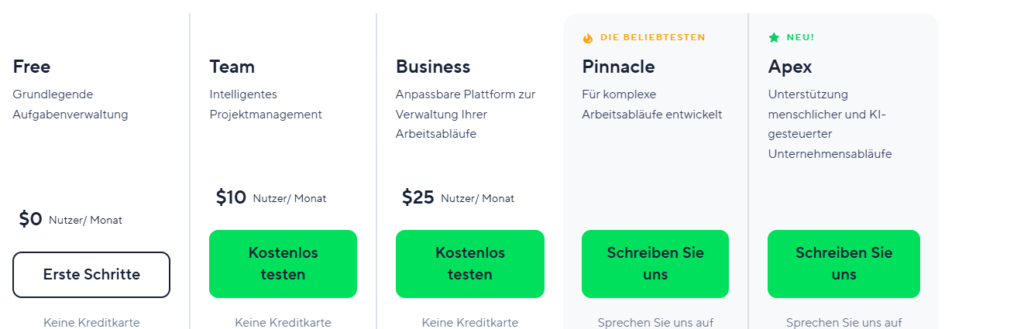
(As of June 2026; costs are subject to change)
By the way,
An overview of the costs of project management software from various providers can be found here.
Additional addons can be added to all variants in the form of subscription. The prices for this are not publicly available.
Free
The Free version is available at no cost with a limited feature set. This version retains the basic functions of a task management tool. Wrike no longer specifies a fixed 5-user limit on its current pricing page; instead, there are restrictions on the number of active tasks. It’s good to know that the following integrations are already available:
- Google Drive
- Dropbox
- Box
- Microsoft Office 365
- OneDrive
- iCal
Wrike Cost: $0.00 /user/month
Team
The Team version (formerly “Professional”) is suitable for small teams and startups. It is designed for 2 to 15 users and offers a basic version for project planning and collaboration, including task management, interactive Gantt charts, and shareable dashboards. Newly included are the basic AI features (AI Essentials). Additional integration of
- MS Project
- Excel
Wrike Pricing: $10.00 per user per month (billed annually)
Business
In the range of 5 to 200 users, the business variant can be selected. This version was tested intensively in the review. The range of functions includes everything you need for a decent project management software:
- Individualization via additional fields, workflows and the workspace
- Real time reporting
- Time recording and graphical analyses
- Roles and rights for teams and projects
- Advanced AI Features (AI Elite)
- Salesforce integration
Wrike Pricing: $25.00 per user per month (billed annually)
Enterprise
If you have more than 200 users or need certain security features even with just 5 users, go with the Wrike’s Enterprise package *. In terms of features, there isn’t much difference from the Business version at first glance. The most important aspects for Enterprise customers are likely to be the enhanced security and improved administration of permissions and roles. Pricing is available only upon request.
Pinnacle
For more complex companies and projects, upgrading to Pinnacle is well worth it. It provides you with secure areas within the tool, advanced reporting features, and budgeting and scheduling capabilities at both the company and project levels. The advanced AI actions (AI Elite) are also available on a larger scale. Pricing is available upon request only.
Apex
Since January 2026, Apex has been the highest enterprise tier and is designed for AI-powered business workflows. Included features include unlimited whiteboards, Wrike Integrate, bidirectional Wrike Sync, the Wrike Datahub with up to 30 million data records, and the most comprehensive set of AI actions (AI Elite). Pricing is available upon request only.
Cost comparison
| Wrike | 1 user | 5 users | 25 users | 75 users |
|---|---|---|---|---|
| Free* | 0$ | 0$ | – | – |
| Team* | $120 | $600 | $3,000 | $9,000 |
| Business* | $300 | $1,500 | $7,500 | $22,500 |
s for Wrike Project Management Software – in U.S. dollars (pm-tools.info, June 2026, Source: wrike.com/de/price/, * = Affiliate Link)
Good to know
: If you’re using the Team or Business version, you can access additional templates. To do so, you’ll need to upgrade to the “Wrike for Marketers *” or “Wrike for Product Management *.”
Our evaluation of Wrike as a project management tool
The advantages
Wrike takes data protection seriously and operates a European data center for data storage within the EU.
The Gantt Chart with milestones gives a good overview of the timeline and is shareable with Snapshot to customers.
Wrike covers large parts of project management with project planning, task management and project controlling. This also makes the software suitable as an overall solution for the management of the organization.
A proper time recording is integrated
For starters, Wrike offers simple task management for free.
The cons
Despite extensive help and tutorials, familiarization requires some time.
Cloud hosting means that users and companies have to be able to rely on the service provider. This can be difficult in some industries (e.g. pharmaceuticals, healthcare).
When looking at extensions or having more than 200 employees, Wrike prices for the software are opaque.
For whom is Wrike worthwhile?
Wrike itself already caters to specific user groups through its pricing tiers and user limits. Small teams, startups, and individuals can use the free version for simple task management. There are several alternatives in this segment, so users have a good selection to choose from.
However, for anyone considering switching to a Team or Business version later on, choosing Wrike makes sense. In our opinion, one of its biggest selling points is its excellent project planning capabilities. Even the Team version includes the interactive Gantt chart, and the price is definitely reasonable. For larger teams, the Business version is limited to companies with 200 or fewer users. This includes , for example , modern skilled trades businesses, consulting firms, or medium-sized marketing agencies. Free guest access, in particular, can help improve collaboration with clients.
Larger companies go for the Business, Enterprise version*, or even Pinnacle. All the features discussed in the Wrike review are included. The entry price compared to direct competitors is comparatively cheap, but you should keep in mind that there are extra costs due to subscriptions. These include resource management or the integration of external applications. Those who want to use the tool as a total solution for enterprise management need time for integration. However, when properly fitted, it can provide good support in everyday life.
Wrike alternatives in review
A comprehensive solution isn’t always the best project management software for you. When considering an alternative to Wrike, the question is which aspect of the comprehensive software you want to address. Here are 3 potential alternatives:
- If you’re looking for a dedicated task management software, Meistertask might be your top choice—see review.
- With InLoox now! as an alternative to Wrike, you get a cloud-based application with a robust Gantt chart – read more in the InLoox now! Review.
- Stackfield is a good counter-suggestion if you attach particular importance to data protection and security and data should remain in Germany.
How to find the software for your project or company, you can see here in the guide.
Change history of the review
| Date | Updates |
|---|---|
| June 15, 2026 | – Prices and plan names updated (Professional → Team, new Apex plan) – AI features (Work Intelligence, AI Essentials/Elite, Copilot) added – Data protection information updated (EU data center, new certifications) |
| December 21, 2021 | – Wrike Pinnacle added – Minor changes to pricing plans, such as removing the user limit on the free plan |
| May 13, 2021 | – Wrike Professional is now available for up to 200 users |
| April 2, 2021 | – Updated menu navigation with a burger menu for expanding and collapsing the menu |
| February 4, 2021 | – Citrix acquires Wrike for $2.25 billion |
| January 5, 2021 | – AI-powered forecasting feature |
| 02.12.2020 | – SharePoint integration, including “Proofing” connectivity |
| November 2, 2020 | – Document scanner in the iOS app “ ” – Reviews also posted by external guest accounts |
| October 8, 2020 | – New document editing features in the Proof Editor, File Viewer, and widgets – Moving attachments |
* = Commission link
Looking for the right tool? Compare Wrike with alternatives in our overview of project management tools, or browse our list of 106 PM tools.
This post is also available on:
 Deutsch
