
Are you looking for task management software and do you handle sensitive data? In this review of Stackfield you can read what advantages this tool has. What do you need to pay attention to if you want to use it as a project management solution.
Intro
The Stackfield test is extensive – you need some time. Alternatively, after the table of contents, there is a short summary of the most important points of the review.
The most important in a nutshell
- The focus is on intra- and inter-project collaboration and solid task management
- For project planning in medium-term projects a basis is there
- Project controlling is not yet covered extensively, but there are further developments in this direction.
- Those who focus on data protection and security are well served and quickly GDPR-compliant
- One has the choice between cloud application and server installation
- With low cost, Stackfield offers affordable software among task management and project management tools
The company
Stackfield GmbH is a German company that was founded in Munich in 2012. The focus at Stackfield* is on a comprehensive solution designed to “improve productivity and collaboration.”
The offer as a freemium model enabled many setting options for the user at low cost. The complexity of the solutions did not keep the customers in the long term. With a change in focus to business customers, the software has been significantly simplified. As of today, the manufacturer serves over 10,000 customers. In this review, the 14-day trial of the business version was examined.
What features does Stackfield offer in the test?
To begin with, one of the most important points: With Stackfield, you choose a project management software that places a special emphasis on security and data protection. The manufacturer offers some additional features that you won’t find in alternative programs.
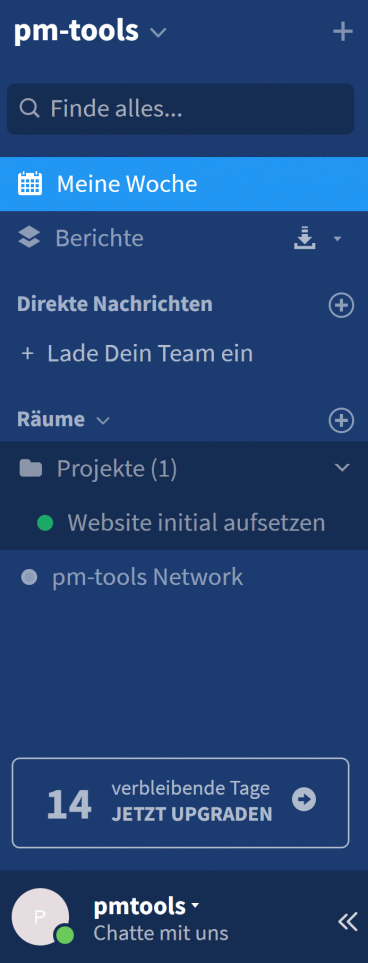
The start of the test by Stackfield* is quick and easy. After registering and reading two brief help texts, you can get started right away. The software is divided into a sidebar and a main screen. The main screen on the right always displays the content of the currently selected section.
In theleft sidebar you will find the menu navigation with
- the dashboard: “My week”
- a reporting function on all projects: “Reports”
- a chat function:“Direct messages”
- the folder structure for projects: “Rooms”
Rooms in Stackfield correspond to what can be considered projects in other tools. The room group represents a superordinate unit. Thus, this can represent different use cases:
- Program with several projects
- Project with subordinate subprojects
- Organizational unit in the company, e.g. marketing, with its own projects
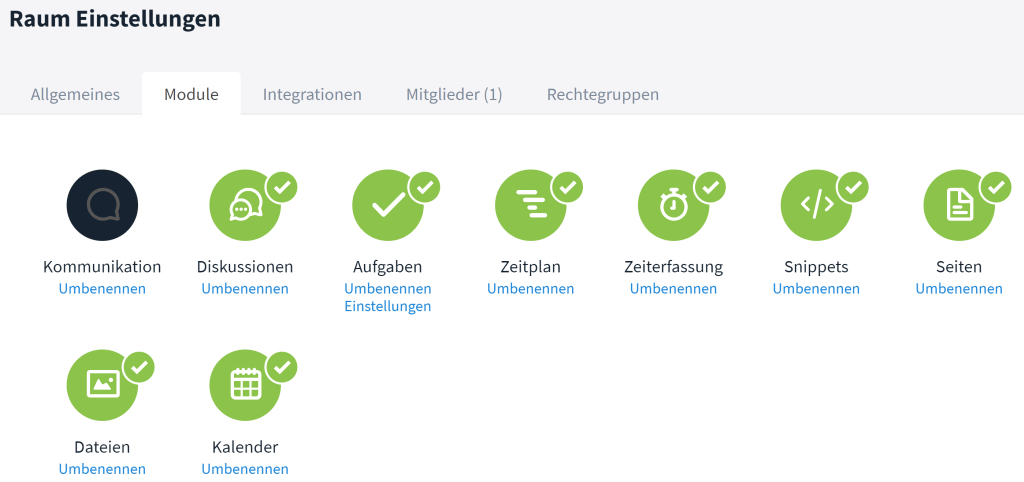
Within rooms you can unlock different modules. These range from simple communication to tasks to a calendar display.
Project planning in Stackfield
This tool shows in the test that it focuses on team collaboration. Nevertheless, the basis of project planning is not neglected and has been increasingly expanded in recent years.
Project Profile
General project datacan be stored for a “room”, in Stackfield* the project:
- Project title
- Brief description
- Deadline
- Effort
- Priority
- Project manager
- Evaluation of completed tasks and recorded times
Milestone planning and Gantt chart
By entering time-related information into tasks, you can create a timeline. The timeline is a simple bar chart or Gantt chart. Here, you can map dependencies between tasks. You can also set milestones. This makes simple milestone planning possible with Stackfield. You can quickly see when tasks aren’t being completed on time and you won’t be able to stay on schedule. Updates have also added a critical path feature and automatic task scheduling.
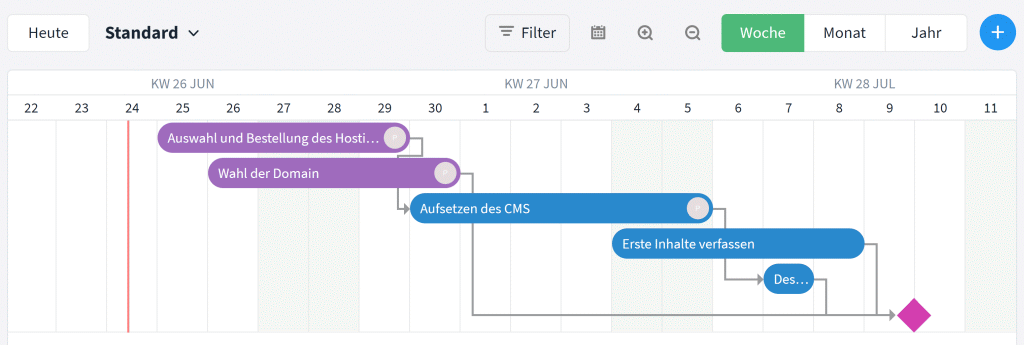
Unfortunately, the display is limited to a period of four months, so that longer projects cannot be displayed clearly. Using the detour of room groups and subordinate rooms, it is still possible to represent a larger project.
There are currently no plans to export data to a traditional project structure plan. However, starting in early 2026, Stackfield will offer its own network planning module (PERT chart) as part of the Premium plan, which allows users to visualize task logic and dependencies as a network diagram (more on this in the Q1 2026 updates). Anyone looking to conduct sophisticated project planning for very large projects will find that Stackfield* will still run into limitations.
Task Management
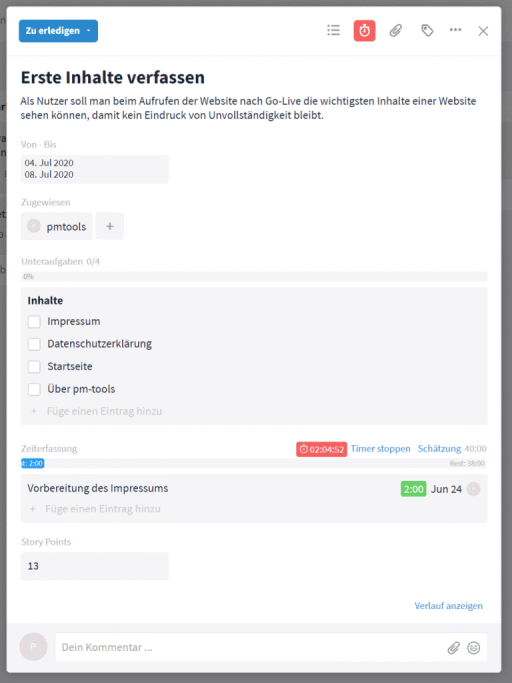
Tasks can be tagged with the most important information as in any task management software. These include:
- Task title
- Description
- Timeline or Deadline
- Processor
- Subtasks or checklist
- Time recording and planned effort
- Activity log
- File attachments
- Grouping label
The setting of user-defined fields is particularly attractive. In the example to the right, the Story Points field was set to provide an additional metric for the complexity of a task. Custom fields can be mandatory, set in number format, letters or even checklists.
Communication and collaboration with Stackfield
Its focus on productivity and collaboration is one of the standout features among various task management tools. Collaboration is a key feature in Stackfield* rests on many different pillars:
- Visualization of tasks
- Customized dashboard for the user
- Comment function in tasks and activity log
- Project level discussion portal
- Integrated chat function with direct messages
- Integrated telephony with screen sharing and group calls
- Roles and permissions
- Surveys to gauge the team’s opinion
The task visualization
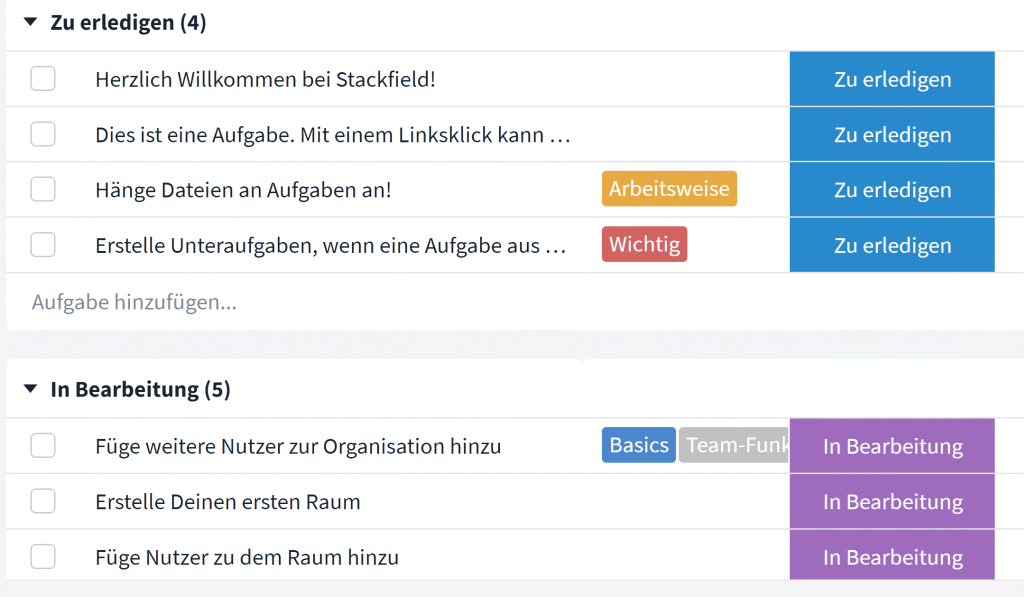
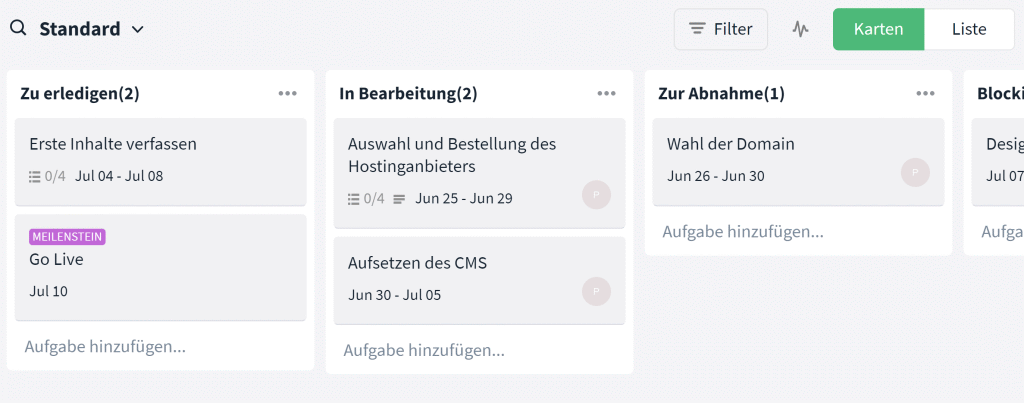
Tasks can be displayed in the form of a simplelistwith filtering option, a Kanban board, the timeline and the calendar display. Especially the Kanban Board shows the current state and simplifies the collaboration through the transparency in the project. Tasks can be moved between different states (To Do, In Progress, Done, etc.).
In the test, we particularly liked the release function in the “For acceptance” column. The new processor can reject and return a task.
Email Integration
Email integration allows you to send or forward emails to Stackfield. Depending on the choice, the email
- be created as a task element
- be created as a chat message in the communication
- be added as a comment to discussions
The individual dashboard
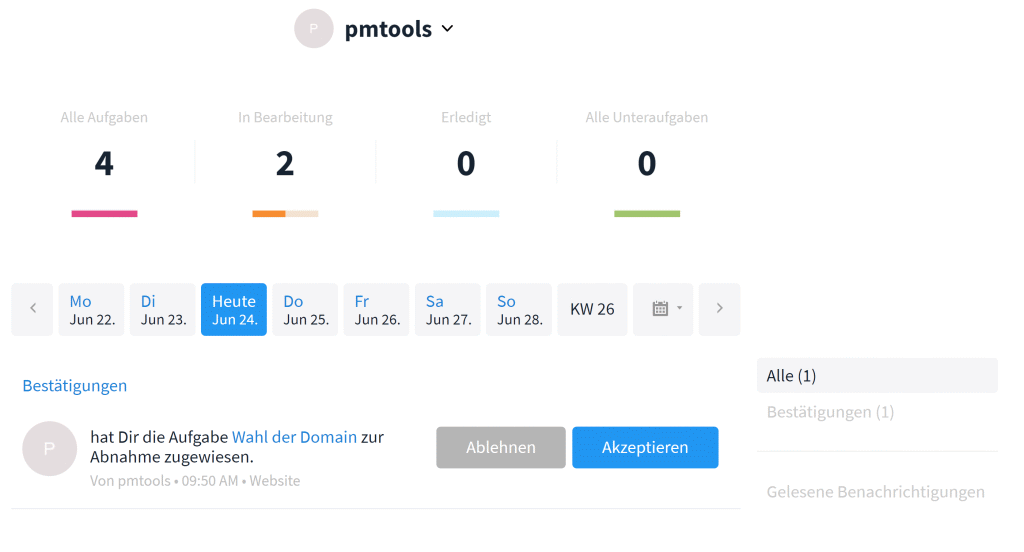
A personalized dashboard shows users their tasks and key metrics for all tasks. The latest notifications and an overview of the organization are also visible. It’s also worth noting that users can accept or decline tasks. Stackfield* is one of the few tools that has taken task management a step further and established the fundamentals of delegation into account.
Comments and activity log
Comments can be set to tasks and added to the activity log of a project. In the log you can track all changes, such as completed tasks, entered times and new tasks.
The discussion portal
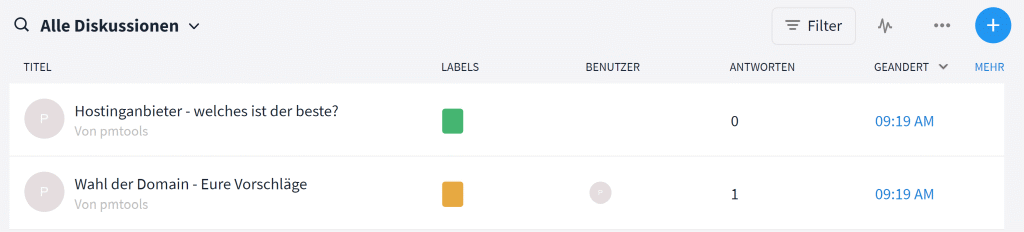
The discussion portal can be used to conduct topic-related communications. Attached to a project, here you have an additional structure that resembles a forum. The advantage is that the discussion remains visually and does not disappear into nirvana after finishing a task (as with comments).
Advanced communication via chat and telephony
With an integrated chat function it is possible to write direct messages to other users. This way enables a short communication chain in the project and the organization. As a supplement, Stackfield still offers the telephony function with screensharing. Especially when working decentrally, these additions pay off and no further tools are necessary. Telephony supports up to 30 people in a call with external users without a stackfield account (e.g. external stakeholders such as customers).
Roles and permissions
With a focus on security, Stackfield* also places a strong emphasis on the permission structure. Individual roles can be assigned, and rooms/projects can be granted specific permissions.
Requirements management
There is no integrated requirements management.
Resource planning
The basis for planning resources is given with the time spent at task level and in projects. Unfortunately, the further link with the working hours of employees and teams is missing. Thus, Stackfield does not provide a basis for resource planning. A view of workload in terms of tasks per employee is possible for the current week.
Project controlling
In the overview of a project, the project profile, there are various controlling mechanisms:
- Display of the status of all project tasks
- Booked times on the project
- Progress in terms of time and effort compared with available values
Unfortunately, project management has come to a standstill, and Stackfield* quickly reaches its limits here when it comes to cost analysis. Comprehensive analyses that include costs in addition to progress in terms of performance and time are not possible.
Document Management
Files can be attached to projects and tasks. Simple means are implemented with comment and preview function for Office documents. Collaboration in the company’s own documentation tool deserves special mention. In Stackfield’s “pages”, the team can work on the document simultaneously – similar to Google Docs. For example, technical documentation or new ideas for the project can be processed in parallel.

Solid document management with versioning, approval and electronic signatures, if required, is not implemented in Stackfield.
Multi-project management
With the Portfolio and cross-project display of tasks in reports features, multiple projects can be managed simultaneously.
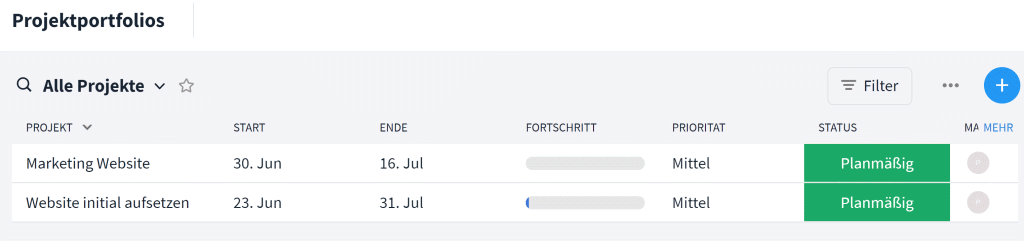
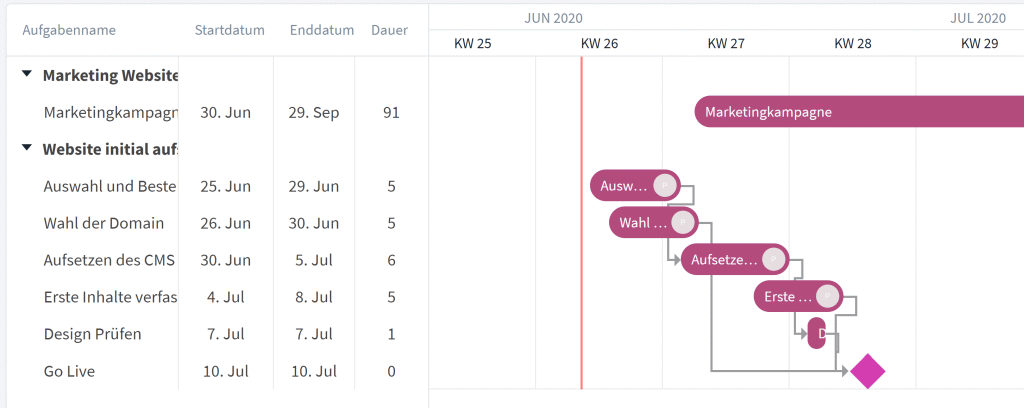
The overview of the project corner data can currently “only” be displayed in the list, but in the future it will also be possible to display it in the Gantt chart.
How does Stackfield perform in the most important evaluation criteria?
Features and functionality
Productivity and collaboration are the manufacturer’s key selling points. That’s exactly what Stackfield* delivers exactly that when you look at its core features. With its focus on task management and collaboration, it’s a solid task management tool for teams. Project planning and general project management techniques—such as controlling, resource planning, and team planning—aren’t the main focus, but they’re solid nonetheless.
To complement the program, there are still several options:
- App Integration
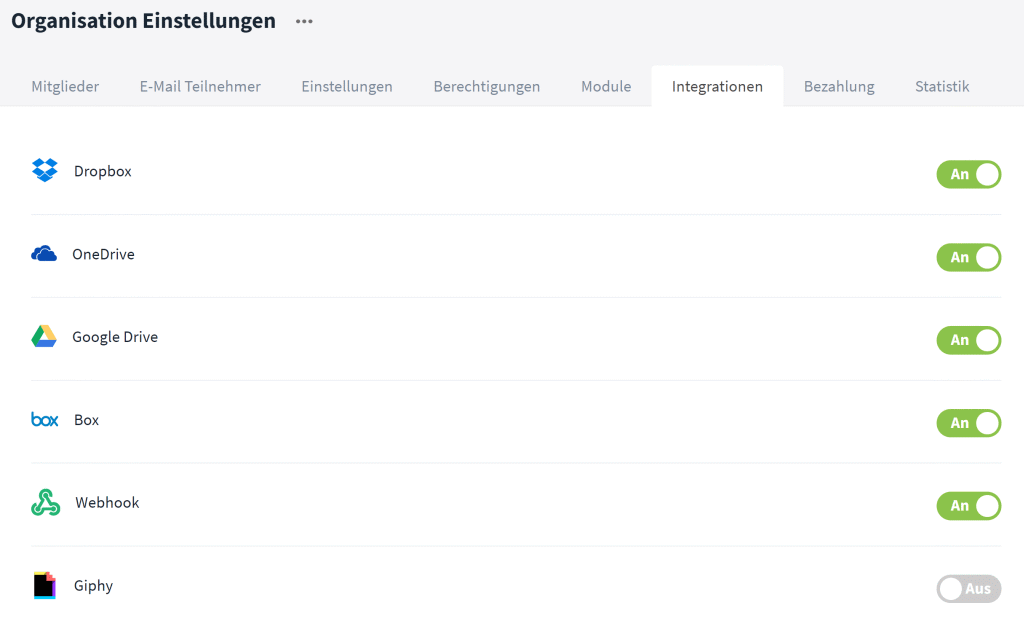
The number of direct external integrations is manageable, but the range of options has been expanded (including Microsoft Teams, OneDrive, and Internet calendar subscriptions). Webhooks and an open API are also available. - Desktop App (Windows/Mac)
- Mobile App (Android/iOS)
- API access for external processing
Other criteria for Stackfield evaluation
- The language can be set to English and German.
- Business, Premium and Enterprise can be used free of charge for 14 days for testing purposes.
- Non-profit organizations receive special conditions
- Each user can extract an export of the personal data
User interface and ease of use
Those who start with Stackfield as a user will quickly find their way around. The user interface is clear and after a few hours of use you know what you find where. Of course, the implementation will take some time if you want to use the software for the entire company. However, this is exactly what the tool is intended for.
With various setting options of a theme or with your own logo, the appearance can still be adapted to your own wishes. In addition, there are simplifications such as the dark mode or the possibility of integrating a screen reader to support people with visual impairments (accessibility).
The Stackfield App
The Stackfield App offers the possibility to work on projects on the go. In doing so, the functions are somewhat reduced, so that you can answer and communicate tasks in the project, but not view Gantt charts, for example. Several use cases are worth highlighting as they make work much easier:
- Time Tracking with the Stackfield App
Especially during client visits without internet access, the app lets you track your time right away. The alternative would be to log your time in the evening after you return or the next morning at the office. - Calendar view with appointments
The calendar view lets you see all appointments in the Stackfield* app. Even without syncing with your own calendar, you can keep track of your work appointments. - Standard Project Communication
Whether it’s a quick direct message during your lunch break or a discussion about tasks on the train—with this app, you can stay reachable even when your laptop is turned off.
Overall, this puts the Stackfield app in line with the standard support for cloud software.
Data protection, hosting and service
Data protection – Where is the data located and where are the servers?
Security and data protection are a key feature of Stackfield. The manufacturer describes in detail is described in detail by the manufacturer here. Here is a brief summary of the key points:
- Two-factor authentication
- End-to-end encryption with a combination of AES and RSA algorithms
- SSL encryption
- Server location in Germany with backup servers at different locations – GDPR compliant
- Certifications under ISO 27001, ISO 27017, and ISO 27018, as well as BSI-C5 certification
- No U.S. hyperscalers: exclusively European subcontractors (no AWS, Google Cloud, or Azure)
Additional mechanisms provide further adjustable protection. This allows you to view an access log for each user. Access can only be enabled for explicit IP addresses. Even notifications in the mobile app or email can have the content turned off to avoid a data leak.
As an additional feature for GDPR compliance, the user can extract his personal data at any time.
Since 2026, Stackfield has also been offering optional AI features as add-ons—such as rephrasing, spell-checking, and translation. In line with our security standards, the AI models are hosted in Germany (IONOS); no data is transferred to third countries. Our PM Software News from Q4 2025 provides an overview of additional feature updates.
Accessibility and stability of Stackfield project management software
Important to know:
In addition to the cloud application (SaaS), you can also choose to install it on your server.
The cloud solution generally runs smoothly but sometimes you have to wait a bit and get “data encryption” messages. The cloud solution generally runs smoothly but sometimes you have to wait a bit and get “data encryption” messages.
Support from the manufacturer (customer service) in case of problems
With online help guide, users get basic information . It’s great that the manufacturer also provides a wide range of ways to get in touch.
- Live Chat
- Phone
- Helpdesk with ticketing
Support via Service Level Agreement
With a customized Service Level Agreement, you can define service hours and response times.
Costs when using Stackfield
Stackfield’s pricing remains moderate by comparison. In addition to an affordable Starter plan, there are three other plans—Business, Premium, and Enterprise—each with an increasing range of features. The Stackfield pricing* are tiered for user groups ranging from 5 to 100 users—of course, the tool can also be used with more than 100 users. All prices are net plus applicable sales tax; you’ll save money by paying annually rather than monthly. (Prices as of June 2026; information provided without guarantee—the current price overview on stackfield.com* is authoritative.)

By the way,
An overview of the costs of project management software from various providers can be found here.
Starter
The Starter Plan is suitable for small teams with basic needs. It is limited to a maximum of 3 rooms and up to 10 users and includes the core features for tasks and collaboration.
Stackfield Pricing: starting at 9 € per user per month (annual payment plan) – equivalent to 45 € per month for 5 users
Business
The cheapest option allows you to work with a solid task management software. Included are the basic features:
- Features
- Tasks
- Milestone plan with Gantt
- Kanban visualization
- Chat and telephony (1:1).
- Time tracking
- Comfort
- Additional apps (mobile and desktop)
Stackfield Pricing: 70 € / 5 users / month (14 € / user / month, billed annually)
Premium
The advantages of the Premium variant are the additional display and use of
- Features
- Portfolio overview
- Group calls in telephony
- Unlimited number of external employees/customers
- Email forwarding to Stackfield
- Individuality
- Individualisierung durch Individualization through own themeTheme
- Security
- IP-Whitelist
- 2FA obligation
- heavy password policy
Stackfield Pricing: 90 € / 5 users / month (18 € / user / month, billed annually)
Enterprise
With the Enterprise variant, you negotiate your own contract. You still get an unlimited number of organizations in the tool. Other additional features include:
- Comfort
- Single Sign-on
- Global export options
- Individuality
- Provisioning via API
- Own modules
- User profiles
- Own mail texts for invitations
- Security
- Compliance confirmation by user
Stackfield* Cost: €140 / 5 users / month (€28 / user / month, billed annually)
Additional Add-ons
In addition, two add-ons can be booked:
- AI Add-on: €3.90 per user per month – available as an add-on for all plans, with models hosted in Germany
- OFFICE Add-on: €2.40 per user per month – available starting with the Premium plan, for collaborative editing of Office documents
Stackfield cost comparison
| Plan | Key Points | Price (annual payment) |
|---|---|---|
| Starter | Tasks, Kanban & Chat; max. 3 rooms and 10 users | Starting at €9 per user per month (€45 per month for 5 users) |
| Business | Milestone schedule with Gantt chart, time tracking, phone calls (1:1), desktop/mobile apps | 14 € per user per month (70 € per month for 5 users) |
| Premium | Portfolio, PERT chart, group calls, unlimited external users, IP whitelist, mandatory 2FA | 18 € per user per month (90 € per month for 5 users) |
| Enterprise | Single sign-on, global exports, API-based provisioning, custom modules, compliance certification | 28 € per user per month (140 € per month for 5 users) |
| Add-ons (optional) | AI: €3.90 per user per month OFFICE: €2.40 per user per month (Premium and above) | |
Our evaluation of Stackfield as a project management tool
The advantages
With its data protection and security features, Stackfield* lays the groundwork for GDPR compliance and outperforms its competitors in tests. Stackfield is the right tool, especially for regulated industries.
Communication in the project is important – here telephony with screen sharing, chat function, discussion forums and notifications support.
Stackfield’s costs are competitive and some alternatives are significantly more expensive.
Task management is further thought out with acceptance and rejection of delegated tasks as well as the release function in the workflow.
Direct support via chat or phone is also available in the cheapest option.
The cons
Simple project planning is guaranteed, but complex projects are difficult to cover.
Basic elements such as team planning, resource planning and project controlling are in their infancy. Here, the project manager may have to resort to external tools.
External integrations are limited. This is also due to safety, but can limit.
There is no exact billing according to the number of users. With 41 users, you have to pay the price for the 60 user package.
For whom is Stackfield worthwhile?
Based on its features, Stackfield stands out in this review particularly in the areas of communication and task management. As a communication tool, it rivals established solutions such as Slack, Microsoft Teams, and WhatsApp. When you add task management to the mix, Stackfield* these applications. The advantage here is that it’s all in one system.
Starting with functional task management, Stackfield is on par with Trello, but extends the solution with the comprehensive communication tools.
Stackfield’s hallmarks are security coupled with special attention to privacy. This makes the tool particularly interesting as a secure alternative to other project management solutions such as Basecamp. Anyone dealing with customer data or otherwise sensitive data needs a secure cloud solution. This affects the entire service industry with agencies, consultancies, lawyers or engineering firms. However, larger institutions in the banking sector or in the field of medical or pharmaceutical research with a high need for patent protection are also a possible target group, which is likely to attach great importance to special security.
However, its use as a comprehensive project management tool is significantly hindered by problems in the areas of resource planning and project controlling. This also applies to project planning, which is sufficient for medium-term projects but cannot provide everything for large-scale projects. It is worth noting Stackfield’s steady expansion in this area.
In our opinion,the size of the company plays a secondary role in the choice of Stackfield. The software is also designed for large companies. If you also need to place a special focus on security, there aren’t many of the “usual” cloud solutions left. Even the use in the corporate group should be feasible with the given structure of the software.
Stackfield Alternatives in Review
Data protection is the focus for you? Besides Stackfield, there are several alternatives that also offer GDPR compliance and emphasize security. Here you can find 3 examples including review:
- Aworkrepresents a comparable alternative in the service sector.
- MeisterTask – with Review – is often seen as a GDPR compliant solution compared to Trello – server locations in Germany make the difference.
- InLoox now! represents a comprehensive project management tool with neat Gantt Chart -. read more in the InLoox now! Review.
How to find the software for your project or company, you can see here in the guide.
Change history of the review
| Date | Updates |
|---|---|
| 16.06.2026 | – Prices updated (Business €70, Premium €90, Enterprise €140 per 5 users/month); New Starter plan starting at 9 € per user – New AI and Office add-ons added – Network planning module (PERT) added starting with the Premium plan – Certifications expanded: ISO 27017/27018 and BSI-C5 certification |
| 06.06.2022 | – New survey feature for internal teams – Gantt chart extension with critical path and automatic scheduling |
| 20.12.2021 | – Observer role and expanded project portfolio – Accessibility through screen reader integration and contrast mode or dark mode – Conference calls for up to 30 participants – Price reduction for Business and Premium plans |
| 02.11.2020 | – New email integration |
| 08.10.2020 | – Price increase in business and premium rates |
| 02.09.2020 | – Video telephony feature for team communication |
| 06.07.2020 | – Preview for Office documents, Updated Learning Center as Online Help |
Looking for the right tool? Compare Stackfield with alternatives in our overview of project management tools, or browse our list of 106 PM tools.
* = Affiliate Links
This post is also available on:
 Deutsch
