
Todoist is considered by many to be a simple to-do list. The Todoist Premium and Business variants are not aimed directly at private individuals.
How far can paid versions of the to-do list app help you in everyday project management? This information and a general overview of the tool and a field report, you will get in this Todoist test and review.
Intro
The most important facts in brief:
This review presents you the experiences from our test. So you don’t have to read it all, here’s a quick review:
- Todoist* goes into the realms of a simple and cost-effective task management tool with Premium and Business
- With the free version you get a simple todo list app
- The big picture shows a solid SaaS solution when you know the appropriate use case
- Data protection is observed, but you should take a closer look at the GDPR case
- The app convinces as a mobile variant for tracking and easier planning of your tasks
The company behind Todoist
doist was founded in 2007 and is now a decentralized, remote-based company. What’s particularly notable about today’s SaaS solutions is that doist operates entirely without external funding and has grown to its current size of 93 employees through bootstrapping. As a result, the original founder remains actively involved in the company—something that is no longer the norm for startups.
With Todoist as a productivity app and Twist as a communication tool, doist offers two complementary solutions for individuals and small and medium-sized businesses.
Getting started with Todoist
In the review, it quickly becomes apparent that this app is heavily focused on increasing productivity in the style of to-do lists. We have tested Todoist Business*, the paid version that is still above the premium tariff.
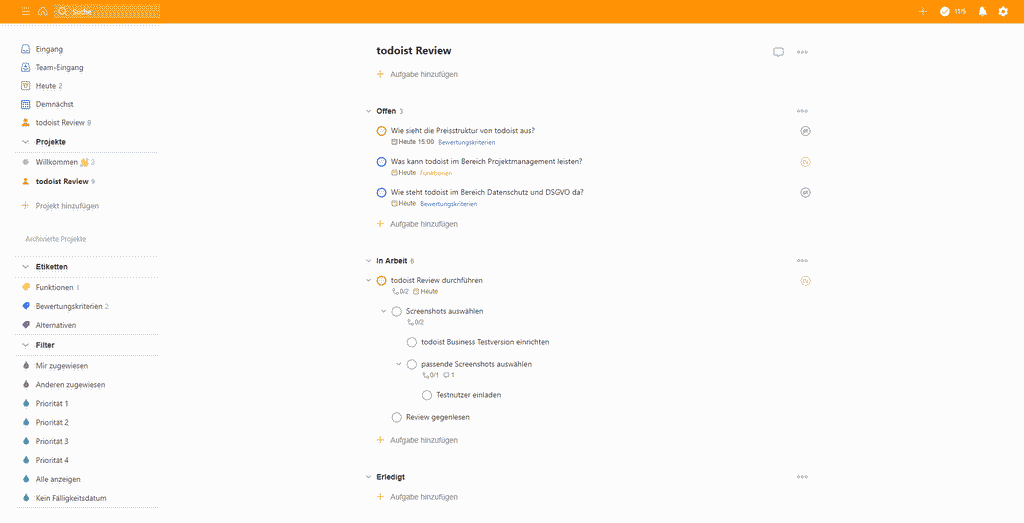
How much project planning is in Todoist?
Due to the strong focus on checking off to-dos, planning projects is limited. There is no possibility of visualization in the form of Gantt charts or timelines. If you want to use this software, you should rather use it for smaller projects and daily business. Nevertheless, the basic structure is presented in the form of projects. You can thus separate different tasks from each other via the projects.
Project summary
The information you can enter at the project level is limited to the project name and a color selection. However, the project display options allow for both list and Kanban-style board views.
More task management than to-do list?
In the area of task management shows Todoist* demonstrates features in our test that go far beyond a simple to-do list. You can attach various pieces of information to a task, allowing you to maintain a good structure and reliably boost your productivity:

- Task title
The title corresponds directly to the task description. This means that ToDoist remains an app that is better suited for simple instructions than for complex tasks. - Deadline
Use a deadline to organize your to-do list even better - Subtasks
Larger tasks should be broken down into several individual steps. - Label/Tag
You can use tags to establish a structure for your projects. In our example of evaluating a tool, we have, for example, a tag called “Evaluation Criteria.” - Comments
The comment feature allows you to attach information directly to the assignments - Priority
Some tasks are more important than others—mark them accordingly.
Recurring Tasks in Todoist
If you’re in Todoist* , simply add a note such as “every week” or “every 3 months” next to the task title.
Communication and collaboration with Todoist Business
Of course, a to-do list doesn’t have to be a comprehensive communication tool. First and foremost, you think of a piece of paper with a few bullet points to check off. Nevertheless, the Todoist Business variant offers some useful options to be able to work together in a team even with the bullet point list. Especially the communication channel directly at the tasks simplifies the collaboration in contrast to a separate software.
Teamwork and Comments in Tasks
As soon as you have two people on your projects, you can assign tasks to team members. They are then responsible for completing them. By working on different devices, you can also stay productive on the go. With the comment feature, your team can also communicate directly within the tasks.
Task-Level File Sharing
You can add files to tasks using drag-and-drop, so your team has more information to work with or so the solution can be attached directly.
Viewing Todoist Kanban Boards
If you choose the board view instead of the usual list view, you can use the Kanban method and maintain a clear overview of the work in your project and team at all times. You can immediately see the task title, assignee, priority, tag, and deadline.
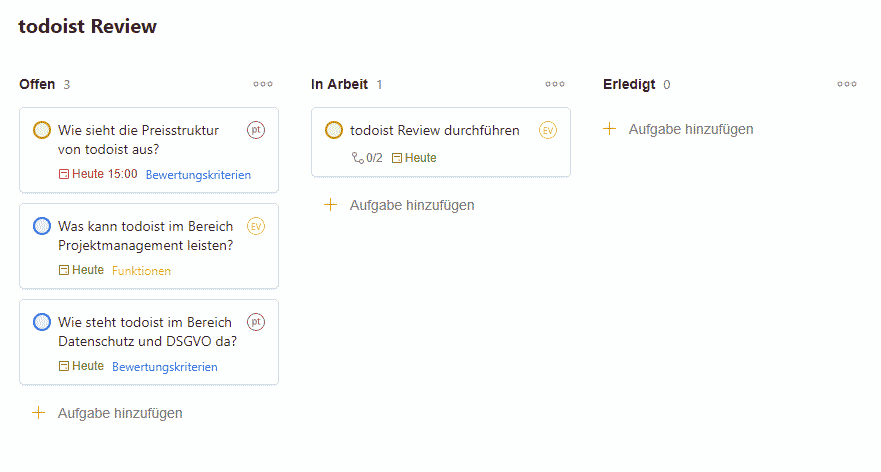
Keep Track of All Activities
The “Activity” feature lets you and your team see what’s been happening at the project or task level. If you’d like, you can set up notifications based on various activities. Notifications can be sent via email, through your browser, the mobile app, or the browser-based app.
The Personal View—A Simple Solution
As a team member, the Personal View is designed to show you the “Tasks Needed Today” in list form. This helps you structure your day and get into work mode.
Roles and permissions
Starting with Todoist Business*, in addition to the administrator role, there is also the team member role. As an administrator, you can assign teams to projects and view the activities of the members.
If you need even more communication tools in the project, doist still offers the tool Twist. This relies more on group chats and time-shifted responses.
Does Todoist have other project management capabilities?
Todoist doesn’t try to branch out beyond the realm of pure task management and classic project management software . As a result, there are virtually no features that support requirements management, controlling, or resource planning , so you’ll need to rely on external tools or integrations.
The structure of the software makes it easy to work on several projects in parallel. With the filter function you and your team can see all projects in which you have ToDos. A total overview of all tasks is also possible. What is missing, however, is the overall bird’s eye view of the existing projects with the number of tasks and the current progress level.
How does ToDoist perform in the most important evaluation criteria?
Features and functionality
ToDoist’s functionality includes some basic features you’d expect from typical task management software . With team collaboration, a Kanban board, and activity reports, the tool is significantly more powerful than a typical to-do list for an individual. Compared to a stripped-down project management software, however, it still has many weaknesses.
However, some particularly interesting functions can help you considerably in everyday project work:
- Add Tasks via Email
You can add tasks directly to your projects by sending an email. This allows you to - Calendar synchronization
Todoist supports Gmail, Outlook and Google Calendar, so you always have all your appointments in view. - Project templates
The so-called project templates are more like Todoist templates for well-prepared to-do lists, but they help you get started with a new topic.
And if you’re still missing a feature or two, you can check out the list of additional integrations to find what you’re looking for—whether that’s tracking time, connecting calendars, or using automation tools. Key examples of Todoist* integrations include Slack and Evernote for communication and documentation, or
Other criteria of Todoist evaluation
- The language can be set to 19 different variants, which allows international editing in the project.
- Premium and Business can be tested free of charge for 30 days. However, you should be careful, because you already have to deposit your credit card data during the test and you have to cancel actively. only if you are not convinced, of course.
User interface and ease of use
The operation of Todoist is one area that is quite convincing. This is exactly how it should be, since you want to check off your tasks quickly at the ToDo level and don’t want to spend a lot of time searching. With little functionality, you or your employees can also quickly learn the tool. Even if an employee isn’t exactly tech-savvy, it should be easy to get started.
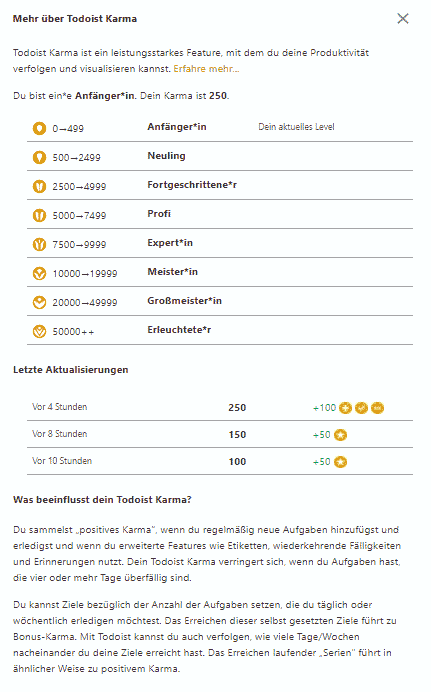
Especially interesting is the so-called “Karma”, a kind of gamification element. Here you can assign yourself points via completed tasks and thus set your daily goal or weekly goal.
For many areas there are shortcuts in Todoist, i.e. keyboard commands. You can find the shortcuts directly in the settings menu of your desktop app.
Only the addition of subtasks is slightly confusing, as multiple nestings are possible here.
Review of the Todoist App

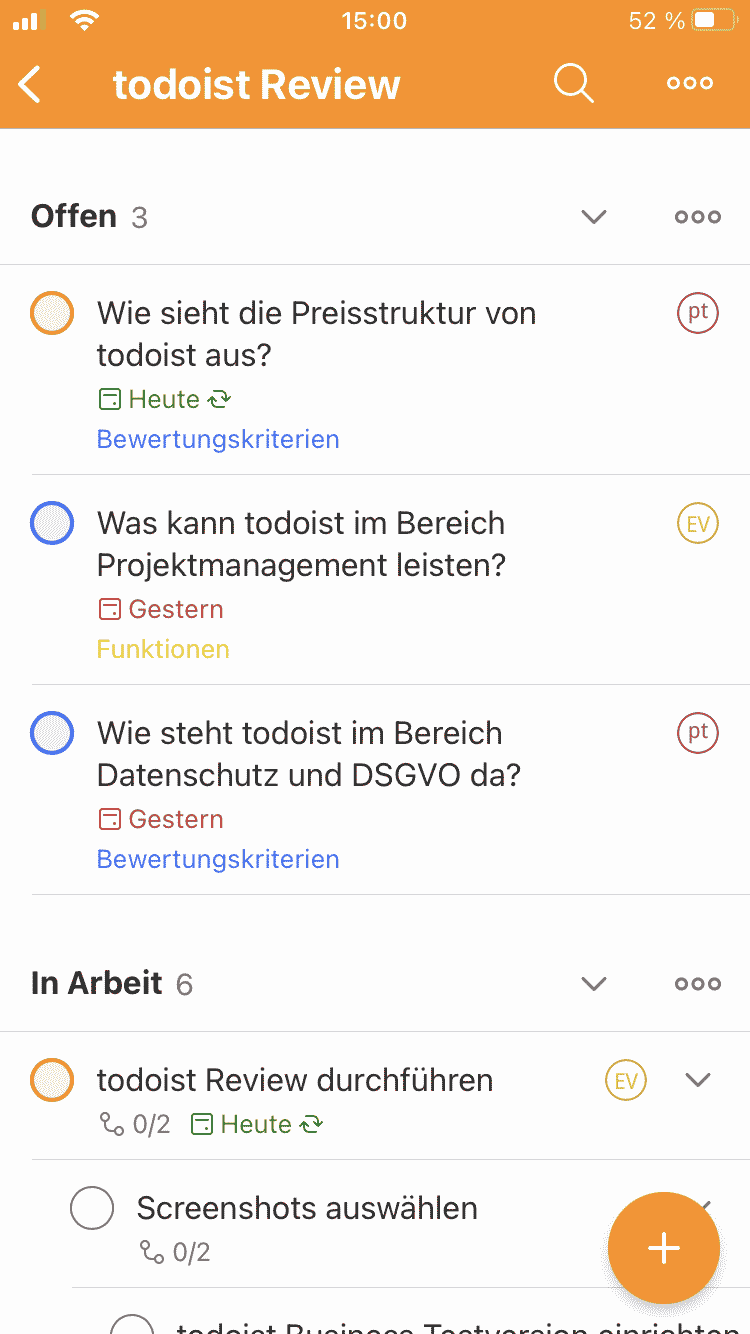
These days, it’s hard to imagine life without to-do lists on the go. Doist has addressed this need as well, and Todoist* for all kinds of platforms (Android and iOS).
In the test, the iOS version of the Todoist mobile app shows pretty much all the features you know from the web version.
Data protection, hosting and service
Todoist Privacy – Where is the data located and where are the servers?
According to Todoist’s statement, the GDPR will be fully complied with since 25.05.2020.
Nevertheless, it’s worth taking a closer look at the details of the privacy policy to determine whether you’re allowed to use the tool. For example, it’s not clear whether there’s a way to restrict data processing outside the EU. In addition, there is a number of third-party providers, and you have to verify GDPR compliance . Ultimately, as a company, you must decide whether Todoist meets your data protection (and GDPR) requirements.
Data is generally AES-256 encrypted and protected again with TLS 1.1 or higher for sending and receiving.
Todoist accessibility and stability
No crashes were observed during testing, and the software ran very smoothly without any lag. The web version of Todoist* with the Chrome browser.
Important to know:
Todoist is available in various versions for web and mobile, as well as for macOS and Windows. There’s even a way to use Todoist on Linux and Ubuntu. Although it’s primarily a SaaS tool, you can work offline. As soon as you have internet access again, your data will be synced with the server.
Support from the manufacturer (customer service) in case of problems
In the help section, you will find quick guides on account setup and the basics of the app. If you ever have problems with the tool, there are extensive FAQs as well as the possibility to contact the support directly. Here doist tries to solve many problems easily directly by selecting clever questions and redirecting to the FAQs.
Unfortunately, there is then only a contact form to reach the support. Even with Premium or Business account, the option for a direct phone call is missing+.
Todoist prices and costs
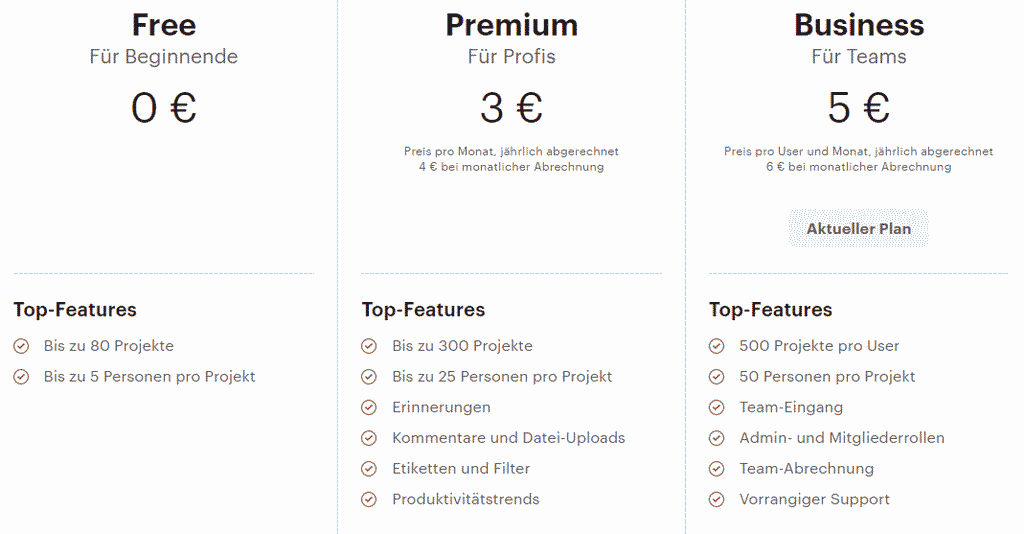
The cost overview in ToDoist is staggered into 3 tariffs from Free to Business. In the case of paid plans, the calculation is always per user and month, whereby the annual price is naturally cheaper than the monthly debit.
By the way,
An overview of the costs of project management software from various providers can be found here.
Free
The free plan offers a simple to-do list app for individuals. You can sign up for signing up for Todoist* , you’ll only be able to use a small portion of the app’s full features.
- max. 80 projects
- max. 5 users per project
- Priorities
- Lists and boards
- external integrations
- Due dates
Todoist Free Cost: 0€ /User/Month
Todoist Premium
With the paid premium version of Todoist, almost all program features you need for a smaller team are unlocked.
- max. 300 projects
- max. 25 users per project
- Memories, comments and uploads
- Labels, filters and activity log
- Themes,Templates und Backups
- Calendar synchronization
Todoist Premium Cost: 3€ /user/month
Todoist Business
Todoist Business offers all the features presented in the review. In contrast to Premium, here you still have extended administration through admin and member roles. In addition, there is a separate team entrance and the possibility to settle teams. Thus, the business variant is primarily aimed at professional use.
What is a bit surprising is the limitation to 500 active projects and max. 50 people per project, as this excludes larger companies. However, a to-do list with more than 50 people may not make much sense anymore.
Todoist Business Cost: 5€ /user/month
Todoist costs and prices comparison
| Todoist | 1 User | 5 User | 25 User | 75 User |
|---|---|---|---|---|
| Beginner | 0 € | 0€ | - | - |
| Pro | 48€ | 240€ | 1.200€ | 3.600€ |
| Business | 72€ | 360€ | 1.800€ | 5.400€ |
Pricing for Projectmanagement Software Todoist per Year - in Euro (pm-tools.info, March 2024, 1 year contract)
Todoist experiences and reviews
Increasing productivity with Todoist – Experience and expert opinion by Ivan Blatter
Ivan Blatter is a productivity coach. He helps his clients work more productively and stress-free. Todoist is a tool that Mr. Blatter used himself for a long time until he switched to a more complex project management tool to handle a wider range of project management tasks. His opinion on Todoist:
Even though I personally don’t work with Todoist anymore, I’m happy to recommend it to my clients if they’re looking for a simple solution that still offers more than what they need. This is exactly what Todoist manages to do.
It’s not so much individual functions that only Todoist can do, but rather the overall package of simple design, clever functions that can handle somewhat more complex task lists, paired with the ability to manage tasks in a team. Todoist brings all this together in one simple interface for every conceivable platform (Android, iOS, Mac, Windows, browser only, etc.).
Our evaluation of Todoist
The advantages
Cost-effective productivity solution for small teams: gamification elements help increase productivity.
Time tracking, documentation tools and more can be added via external integrations
The notifications help to keep tasks in view
The support with FAQ, help pages and support is convincing
The cons
Few project management functions
In order to test the business variant, you must provide your credit card and actively cancel it for the completion of the test – otherwise you will continue to pay directly.
The situation in the area of GDPR is not entirely clear – here, the customer must explicitly look at whether data storage outside the EU is a problem.
For whom is Todoist worthwhile?
The review highlights significant differences in how the app works across different pricing plans:
If you choose the free version, it’s really only suitable for use as a simple to-do list for individuals. Here, you can Todoist* for Getting Things Done (GTD) or other productivity methods.
The focus of Todoist Premium and Business continues to be on individuals but also on small teams and startups. The tool represents a simple variant of task management and tries to continue this way with the new Kanban board. In the long term, integrations offer the possibility of adding missing functions via external services.
If you want to increase productivity in thesmall companyof around 50 employees and have simple tasks rather than need complex descriptions, Todoist Business can be the right solution for you. At least Todoist remains cheaper than many providers from the pure task management.
If you have not yet had any contact with task management, Todoist can give you a first uncomplicated introduction to this topic.
Todoist alternatives in review
- Wunderlist used to be a competent alternative to Todoist. Today it is its successor ToDofrom the portfolio ofMicrosoft 365.
- With any.do there is an alternative to Todoist, which has a little less functionality but is cheaper.
- The productivity tools MeisterTask and Trello setzen increasingly rely on Kanban to represent work.
- Asana can do many things that go far beyond a simple to-do list. For some, Asana is the next step when moving from multiple tools to a comprehensive solution (in project management).
Looking for the right tool? Compare Todoist with alternatives in our overview of project management tools, or browse our list of 106 PM tools.
This post is also available on:
 Deutsch
